The Agentic Loop: What Actually Ends It
What an agent really is — a model in a loop with tools — and what drives each turn and ends it: stop_reason and the full set of stop reasons, the Agent SDK's autonomous loop and its ResultMessage subtypes, model-driven control, and the three loop-termination anti-patterns to recognize on sight.
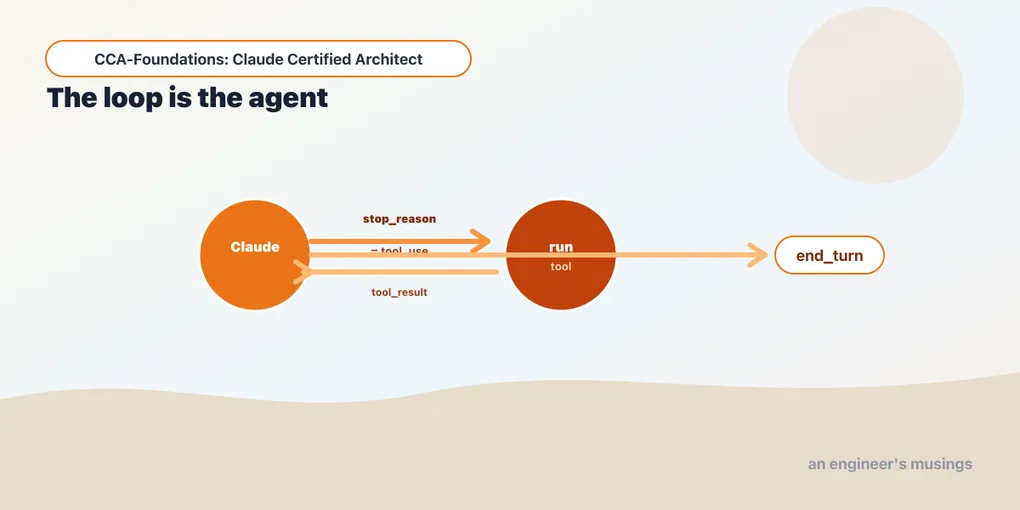
An agent is a language model in a loop with tools. That one sentence is the whole subject, and the word carrying it is loop.
A plain model call is one shot: you send a prompt, you get text back, you are done. That is enough when the task is “summarize this paragraph” or “answer this from what you already know.” It stops being enough the moment the task needs information the model doesn’t hold, or actions it cannot take on its own. Look up an order, read a file, query a database, call an API. For those, the model has to act, see what came back, and decide what to do next, often several times before it can answer. Wrapping the model in a loop that runs the tools it asks for and feeds the results back is what turns a text generator into an agent.
Why a loop — and when one call is enough
The loop exists to give the model autonomy over its own next step. On an open-ended task you don’t know in advance how many lookups it will take, or which ones, or in what order. That depends on what each result turns out to say. A support request might resolve in one tool call or need five, and only the model, reading the results as they arrive, can tell. The loop is what lets it find out.
The honest counterweight: not everything needs one. Say the task is a single transformation with no external information — rewrite this text, classify this ticket, extract fields from a string you already hold. A plain model call is simpler, cheaper, and easier to reason about, and reaching for an agent loop only adds iterations and cost you don’t need. The documented guidance is to start with the simplest thing that works and add the loop only when the task genuinely has to act and react. When it does, the mechanics below are what you are signing up for, and the exam tests them precisely: what drives an iteration, and above all what ends one.
Two levels: the loop you drive, and the loop that drives itself
There are two places you can work, and it pays to know both because the exam moves between them. At the lowest level, the anthropic Messages API, you write the loop yourself and see every moving part. One level up, the Claude Agent SDK runs the same loop for you and hands you the result. Same cycle, two vantage points: start with the hand-written one, because the managed one is this with the plumbing hidden.
The loop, at the raw API level
At the lowest level, the anthropic Messages API, you run that loop, and it turns on one field: stop_reason. Each turn, you send the conversation to Claude with a set of tools; Claude replies; you inspect why it stopped. If it stopped to call a tool, you run the tool, append the result, and go again.
import anthropic
client = anthropic.Anthropic()          # reads ANTHROPIC_API_KEY from the environment

tools = [{
    "name": "lookup_order",
    "description": "Look up a bookshop order's status by its order id.",
    "input_schema": {
        "type": "object",
        "properties": {"order_id": {"type": "string"}},
        "required": ["order_id"],
    },
}]

def run_tool(name, tool_input):         # your real implementation goes here
    return '{"status": "shipped", "eta": "2026-06-02"}'

messages = [{"role": "user", "content": "What's the status of order A17?"}]

while True:
    resp = client.messages.create(
        model="claude-haiku-4-5",
        max_tokens=1024,
        tools=tools,
        messages=messages,
    )
    if resp.stop_reason != "tool_use":
        break                       # Claude is done talking — this is the answer

    messages.append({"role": "assistant", "content": resp.content})
    results = []
    for block in resp.content:
        if block.type == "tool_use":            # block.id, block.name, block.input
            output = run_tool(block.name, block.input)
            results.append({
                "type": "tool_result",
                "tool_use_id": block.id,          # ties the result to the request
                "content": output,
            })
    messages.append({"role": "user", "content": results})

print(resp.content[0].text)          # final answer, stop_reason == "end_turn"
That is the entire mechanism, and every part of it is exam-relevant. The assistant reply carries tool_use content blocks each with an id, name, and input. You run the named tool with that input, and return the output as a tool_result block whose tool_use_id matches the request’s id. The loop continues while stop_reason == "tool_use" and terminates on end_turn. (In a real loop, get_order_status is called, fed a tool_result with the matching tool_use_id, and the stop_reason sequence is ['tool_use', 'end_turn'] — the loop continues on the tool call and ends on the answer.)
The critical insight: you loop on stop_reason, not on anything you read out of the text. The model tells you why it stopped as a structured field. You never parse its prose to decide whether it’s finished.
The full set of stop reasons
The exam’s task statement frames it as “tool_use vs end_turn,” but a well-designed agent handles all of them, and items may probe the edges. anthropic 0.120.0’s Message.stop_reason is exactly:
Literal["end_turn", "tool_use", "max_tokens", "stop_sequence",
        "pause_turn", "refusal", "model_context_window_exceeded"]
What each means for your loop:
tool_use: Claude wants a tool run. Execute, append results, continue. (the loop continues)end_turn: Claude finished its turn with a normal reply. (the loop ends)max_tokens: the response hit themax_tokenscap mid-generation. The output is truncated, not complete; you handle it (raise the cap, or continue), you don’t treat it as an answer.stop_sequence: a stop sequence you configured was emitted. Expected, if you set one.pause_turn: a long-running turn was paused (used with certain server-side tools); you send the response back to continue it.refusal: Claude declined to continue for safety reasons; treat as terminal, surface appropriately.model_context_window_exceeded: the conversation outgrew the context window. This is a reliability signal, and it’s exactly what Domain 5’s context management exists to prevent — an agent that ignores it just fails.
Knowing this set shows why “end the loop when it’s not tool_use” is almost right but incomplete. max_tokens and refusal aren’t “answers,” and the naive if resp.stop_reason != "tool_use": break above would treat a truncated max_tokens response as a finished one. A production loop checks for end_turn explicitly and handles the rest.
The loop, at the Agent SDK level
Writing that loop by hand is instructive and, most of the time, not what you’d ship. The Claude Agent SDK runs the loop for you. You call query() and consume a stream of messages; the SDK handles the tool-use iterations internally and signals completion with a final ResultMessage.
import asyncio
from claude_agent_sdk import query, ClaudeAgentOptions

async def main():
    async for message in query(
        prompt="What's the status of order A17?",
        options=ClaudeAgentOptions(allowed_tools=["mcp__shop__lookup_order"]),
    ):
        print(type(message).__name__)

asyncio.run(main())
A reminder from the setup note: the SDK launches the claude CLI, which reads ANTHROPIC_API_KEY from the environment (or an existing claude login) — a .env file isn’t loaded for you, so export or source it first. With no key reachable, query() fails with an authentication error rather than hanging.
What the stream actually yields
query() is an async iterator, and each message it yields is a typed object. The stream mirrors the raw loop you just wrote by hand — the same send/run/continue cycle, surfaced as messages. Running the example above against a real tool call, the sequence is:
SystemMessage— lifecycle and metadata, beginning with aninitevent that carries the session id, the model, and the tools available for the run. Informational; you rarely act on it.AssistantMessage— a turn from the model. Itscontentis the same list of blocks as the raw API: text, atool_userequest, or a thinking block.UserMessage— the SDK feeding a tool result back into the conversation. You didn’t send this; the SDK synthesized the “user” turn carrying the tool’s output — exactly thetool_resultstep you appended by hand in the raw loop.ResultMessage— the single terminal message, emitted once when the run ends. This is the one you act on.
So a run that calls one tool streams roughly SystemMessage(init) → AssistantMessage(tool_use) → UserMessage(tool_result) → AssistantMessage(text) → ResultMessage. (There’s also a StreamEvent for incremental/streaming output, plus a few specialized message types, but those four are the flow you’ll reason about.)
Here you do not inspect stop_reason yourself — the SDK abstracts the whole tool_use→run→continue cycle. Instead, termination is reported by that final ResultMessage, whose subtype tells you how the run ended. The SDK’s ResultMessage carries subtype, num_turns, total_cost_usd, usage, result, is_error, and more, and the subtypes are:
success— the agent completed the task.error_max_turns— it hit themax_turnslimit.error_max_budget_usd— it hit themax_budget_usdcap.error_during_execution— an error occurred mid-run.error_max_structured_output_retries— structured-output validation failed too many times.
This maps cleanly onto the raw picture: subtype == "success" corresponds to the loop reaching end_turn, while the error_* subtypes are the guardrails (turn limit, budget) that stop a runaway. (A query() returns a ResultMessage with subtype == "success" and is_error == False, the normal-completion case.)
When do you use which? Reach for query() / the SDK when you want the standard agent loop with built-in tools, MCP, and guardrails — which is most of the time. Drop to the raw Messages API loop when you need to own the control flow: custom termination logic, injecting steps between tool calls, or a non-standard iteration pattern. Both are legitimate; the exam wants you to know that the SDK’s loop is the raw loop, managed, so you can reason about it either way.
Model-driven vs. pre-configured
One more distinction the blueprint draws explicitly, because it separates an agent from a script. In an agentic loop, Claude decides which tool to call next based on the current context. It reasons over the conversation and the tool results so far and chooses. That is different from a pre-configured decision tree or a fixed tool sequence, where your code decides the order and the model just fills in arguments.
The agentic approach is what lets a support agent handle an ambiguous request: it might call get_customer, see the account is delinquent, and decide to call escalate_to_human rather than process_refund — a path you didn’t hard-code. The exam favors model-driven control for open-ended tasks and reserves fixed sequences for genuinely deterministic flows. Picture an item describing an agent that “always runs tools A then B then C regardless of results.” That’s a pre-configured pipeline masquerading as an agent, and usually the wrong design for the ambiguous scenarios the exam poses.
The three anti-patterns to recognize on sight
The blueprint names these as anti-patterns, which means the exam will offer them as tempting wrong answers. Each is a way of ending the loop that isn’t stop_reason, and each is wrong for the same underlying reason: it substitutes a fragile heuristic for the structured signal the API already gives you.
-
Parsing the model’s natural language to decide the loop is done. Watching for the model to say “I’m finished” or “here is your answer” and terminating on that. Wrong because the text is not a contract — the model might say “let me check that” and then stop, or produce an answer without any such phrase. The
stop_reasonfield is the contract; the prose is not. This is the anti-pattern most likely to appear as a plausible distractor. -
Using an arbitrary iteration cap as the primary stopping mechanism. Capping at “10 iterations” and calling that your loop’s control. Wrong because a cap is a safety backstop, not a completion condition. A task that legitimately needs 12 tool calls fails, and a task that finished in 2 wastes nothing but taught you nothing about why it stopped. Caps like
max_turnsandmax_budget_usd(the SDK’serror_max_turns/error_max_budget_usdsubtypes) exist precisely as backstops against a runaway; leaning on them as the main exit is designing for the failure case instead of the success case. -
Checking for assistant text content as a completion indicator. Treating “the assistant produced some text” as “the agent is done” — concretely, reading
resp.content[0].text, or scanningresp.contentfor any text block, and breaking the moment one is present:# WRONG — text presence is not a completion signal def is_complete(resp): for block in resp.content: if block.type == "text": return block.text # "done" even on a turn that ALSO asked for a toolThe trap is that an assistant message is a list of content blocks, and a single turn can hold both a text block and a
tool_useblock. Claude often narrates (“Let me look that up…”) in the very message where it requests a tool. On such a turn,resp.content[0]may well be that narration text whileresp.stop_reasonistool_use. Readcontent[0].textas “the answer” and you return the narration and stop the loop before the tool it just asked for ever runs. Text can appear on any turn, so its presence tells you nothing about completion — onlystop_reasondoes. (Readingcontent[0].textis perfectly fine after you’ve confirmedstop_reasonis nottool_use, which is exactly what the loop above does at the end.)
All three share a fix, and it’s the whole lesson of the post: terminate on the structured stop_reason (or the SDK’s ResultMessage.subtype), never on a heuristic read of the output. When an exam item asks how to end a loop, the answer that inspects stop_reason/subtype is right, and the three above are the traps.
Final thoughts
The agentic loop is send-inspect-execute-repeat, driven by stop_reason at the raw API level and by the SDK’s managed loop with its ResultMessage subtypes one level up. The exam’s Domain 1.1 rewards knowing the full set of stop reasons (not just tool_use/end_turn), understanding model-driven control versus a pre-configured pipeline, and — above all — recognizing the three termination anti-patterns as wrong on sight. Get the loop’s control flow right and the rest of Domain 1 is elaboration on it: more agents, and the plumbing between them.
Next: multi-agent orchestration — coordinator–subagent systems, what a subagent can and can’t see, and how to decompose a task without leaving gaps.
Comments