Feeding Claude Images and PDFs
Multi-format input — images as base64, URL, or file_id; PDFs as document blocks; the Files API for upload-once-reference-many; and what a picture or a page actually costs in tokens.
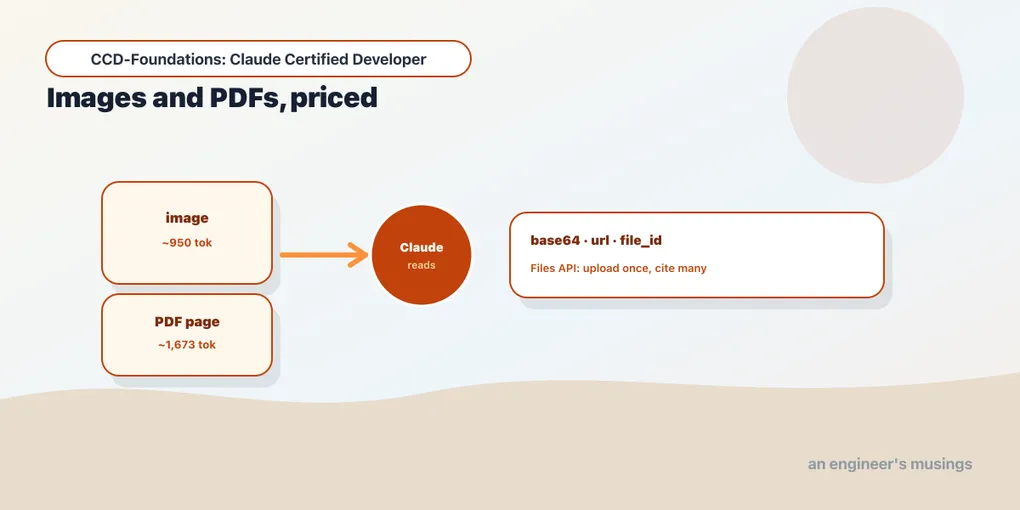
Claude reads more than text. Point it at a screenshot, a scanned invoice, a product photo, or a PDF. It answers questions about the pixels and the pages, not just any words you typed alongside them. Real applications lean on this constantly: a support tool that reads the receipt a customer uploaded, an agent that consults a reference manual, a pipeline that pulls totals off invoices. This is what the blueprint calls “multi-format input,” and it is one small extension of the two chapters before it.
The mechanics stay consistent with everything so far. Instead of the plain string you passed as content in the first chapter, you pass a list of typed content blocks. One of those blocks carries an image or a document. That is the whole idea; the rest is which block types exist and how you supply the bytes. This chapter covers images and PDFs, the Files API that lets you upload once and reference many times, and what a picture or a page costs. That last part is the one that bites, because visual input is emphatically not free.
Content blocks, the general form
Recall from chapter 1 that content can be a string or a list of blocks. Multi-format input is the list form:
import anthropic
client = anthropic.Anthropic()

resp = client.messages.create(
    model="claude-haiku-4-5",
    max_tokens=256,
    messages=[{
        "role": "user",
        "content": [
            {"type": "image", "source": {...}},              # the image (see below for a real source)
            {"type": "text", "text": "What's in this picture?"},  # the question about it
        ],
    }],
)
The order is up to you, but placing the media before the text that asks about it is the documented convention and reads naturally to the model. Everything below is a variation on which block types you include.
Images: three ways to supply the bytes
An image block’s source can take three forms:
# 1. base64 — you have the bytes
{"type": "image", "source": {"type": "base64", "media_type": "image/png", "data": b64_string}}

# 2. url — Claude fetches it
{"type": "image", "source": {"type": "url", "url": "https://example.com/cover.jpg"}}

# 3. file — you uploaded it once via the Files API (below)
{"type": "image", "source": {"type": "file", "file_id": "file_..."}}
Supported formats are JPEG, PNG, GIF, and WebP. With the base64 form, passing a PNG and asking “what is the big title text in this image?” the model answered correctly with the exact words rendered in the picture. The mechanism just works; the interesting part is the cost.
What an image actually costs
Images consume input tokens proportional to their pixel dimensions, and this catches people off guard when the bill arrives. Measured with count_tokens on the same question, with and without an image attached:
count_tokens, text only:      23 tokens
count_tokens, text + image:  973 tokens   →  ~950 visual tokens for the image
That image alone cost roughly 950 tokens — over forty times the text question. Images are tokenized by area (Claude tiles them into patches), so a large photo can cost well over a thousand tokens before you’ve written a word of prompt. The practical consequences:
- Resize before sending. Claude auto-downscales oversized images. But if you pre-resize to the resolution you actually need, you control the cost instead of paying for pixels the model then throws away.
- Count with the image included. As chapter 1 warned,
count_tokensonly measures what you pass it — so budget with the image block in the request, not the text alone. - Batch of images multiplies fast. A request with several images is several times this cost; there are per-request image limits (in the hundreds) precisely because each one is heavy.
PDFs: document blocks
PDFs use a document block, and Claude reads them as both extracted text and rendered page images. So it can answer questions about layout and tables, not just the raw text. Same two supply methods as images, base64 or file_id:
import anthropic
client = anthropic.Anthropic()
b64_pdf = "..."   # requires a base64-encoded PDF string (base64.standard_b64encode(pdf_bytes).decode())

doc = {"type": "document",
       "source": {"type": "base64", "media_type": "application/pdf", "data": b64_pdf}}
resp = client.messages.create(model="claude-haiku-4-5", max_tokens=64,
    messages=[{"role": "user", "content": [doc, {"type": "text", "text": "What's the total due?"}]}])
With a one-page synthetic invoice (three line items, “TOTAL DUE: $45.00”), the model returned $45.00 correctly. The cost signal is the headline, though — that single page reported 1,673 input tokens. Because each page is rendered to an image and text-extracted, PDFs are among the most token-expensive inputs you can send. A fifty-page document is not a casual request; it’s a deliberate, budgeted one. If you only need a few pages, split the PDF first.
The Files API: upload once, reference many
Sending the same document as base64 on every request is wasteful — you re-upload and re-encode the bytes each time. The Files API lets you upload once and reference by file_id afterward. End to end:
import anthropic
client = anthropic.Anthropic()

# upload (currently a beta endpoint) — requires an invoice.pdf file on disk
up = client.beta.files.upload(file=("invoice.pdf", open("invoice.pdf", "rb"), "application/pdf"))
# up.id == "file_011CdXdMZk3XxvNaa8ZUMWxM", up.filename == "invoice.pdf", up.mime_type == "application/pdf"

# reference it by id, with the Files API beta header
doc = {"type": "document", "source": {"type": "file", "file_id": up.id}}
resp = client.beta.messages.create(
    model="claude-haiku-4-5", max_tokens=64,
    betas=["files-api-2025-04-14"],
    messages=[{"role": "user", "content": [doc, {"type": "text", "text": "What's the total due?"}]}],
)
This returned $45.00 as well, from the file_id rather than inline bytes. Facts worth carrying:
- The upload is currently a beta feature, gated by the
files-api-2025-04-14beta header (passed asbetas=[...]on the beta client). Beta headers are a recurring API-mechanics detail: newer capabilities ship behind them before graduating. - The upload returns metadata —
id,filename,mime_type,size_bytes,created_at. You reference theid. - Uploading and the file-management operations (list, retrieve, delete) are free; you pay input tokens only when a file is actually used in a message.
- Uploaded files are not downloadable back out by default — the download endpoint serves files produced by tools (code execution, skills), not ones you sent up. Don’t design a round-trip through it.
The Files API is the right tool when the same document feeds many requests — a policy manual an agent consults repeatedly, or a reference PDF across a conversation. It turns a per-call upload into a one-time one.
Extended thinking is not multi-format input
The blueprint lists “vision, thinking, caching” together under API mechanics, and it’s easy to conflate them. So one clarification: extended thinking is an output mode, not an input format. It’s a parameter that lets the model reason before answering, and it belongs to model optimization — we cover it in Arc 4. Multi-format input is images and PDFs going in; thinking is reasoning coming out. Keep them separate in your head; the exam does.
Final thoughts
Multi-format input is the content-block list form of a normal Messages call: image blocks (base64, URL, or file_id; JPEG/PNG/GIF/WebP) and document blocks for PDFs (read as text and page images). The mechanics are easy; the cost is the lesson — a single image ran ~950 tokens and a one-page PDF ~1,673, so resize images, split large PDFs, and always count_tokens with the media attached. When one document serves many requests, the Files API turns repeated uploads into a single file_id reference. Get the shapes and the token economics right and multi-format input stops being a surprise line on the bill.
Next: errors and retries — the exception taxonomy, what the SDK retries for you, and how to build a client that survives a bad night on the network.
Comments