Building an MCP Server
The Model Context Protocol — why a capability shared across apps wants a server, the three primitives (tools, resources, prompts), authoring one with FastMCP, the stdio and HTTP transports, and how a Claude application connects to it.
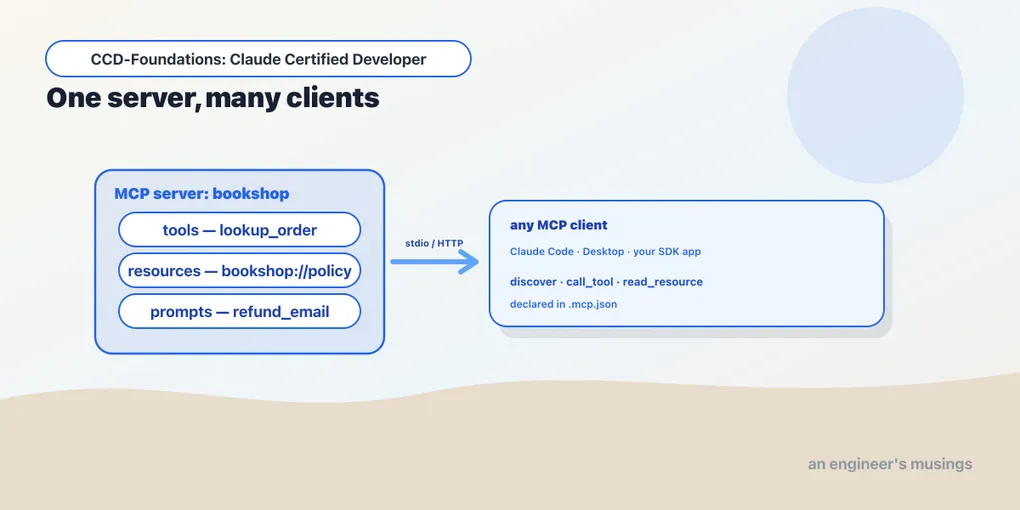
Chapter 10 built tools inside an application. That works right up until a second application needs the same capability. Picture an internal inventory service that several Claude apps must share, maintained on its own release cycle and independent of any one app. Copy the logic into each app’s prompt and you’ve failed both requirements at once. It’s duplicated rather than shared. And it’s tangled into apps that ship on different schedules, so a fix has to be made in every copy.
The answer is an MCP server — a capability packaged behind a standard protocol so any Claude application can connect to it and gain that capability. This chapter builds a real one and connects to it. (This is MCP Server Development, the second skill of Arc 3’s tools domain; the MCP series covers the protocol in full depth.)
What MCP is, in one paragraph
The Model Context Protocol is an open standard for exposing capabilities to LLM applications over a defined wire protocol. Instead of every app re-implementing “look up an order,” you write an MCP server once. Any MCP-aware client then connects to it and gains its capabilities — Claude Code, the desktop app, your own SDK application. It’s the USB-C of tool integration: one standard plug, many hosts. That reusability is exactly the requirement the inventory service posed, and why “build an MCP server” beats “hard-code it into each prompt.”
The three primitives
An MCP server exposes three kinds of thing, and the difference between them decides which one your capability should be:
- Tools: actions the model can invoke (look up an order, issue a refund). Model-controlled, like the tools from chapter 10.
- Resources: data the client can read (a policy document, a config file, a record). Application-controlled context, addressed by URI.
- Prompts: reusable prompt templates the user or client can invoke (a “draft a refund email” template). User-controlled.
The mnemonic: tools are for doing, resources are for reading, prompts are for reusing. A server can expose any combination.
Authoring a server with FastMCP
The Python SDK’s FastMCP makes a server a handful of decorated functions. Here’s a real bookshop server exposing one of each primitive:
from mcp.server.fastmcp import FastMCP
mcp = FastMCP("bookshop")
DB = {"A17": {"status": "shipped", "eta": "2026-06-02"}}

@mcp.tool()
def lookup_order(order_id: str) -> dict:
    """Look up a bookshop order's status by id."""
    return DB.get(order_id, {"status": "unknown"})

@mcp.resource("bookshop://policy")
def refund_policy() -> str:
    """The bookshop's refund policy."""
    return "Refunds accepted within 30 days of delivery."

@mcp.prompt()
def refund_email(order_id: str) -> str:
    """Draft a refund email for an order."""
    return f"Write a polite refund email for order {order_id}."
The decorators do the protocol work. @mcp.tool() registers a callable tool, and its docstring becomes the description the model reads — chapter 10’s lesson applies. @mcp.resource(uri) registers readable data at a URI. @mcp.prompt() registers a template. The type hints become the input schema automatically.
Connecting to it
Now stand the server up and connect a client. This uses an in-memory session, but it carries the same protocol a real transport does. Every primitive is exercised:
import asyncio
from mcp.shared.memory import create_connected_server_and_client_session

async def main():
    async with create_connected_server_and_client_session(mcp._mcp_server) as client:
        print("tools:     ", [t.name for t in (await client.list_tools()).tools])
        print("resources: ", [str(r.uri) for r in (await client.list_resources()).resources])
        print("prompts:   ", [p.name for p in (await client.list_prompts()).prompts])
        order = await client.call_tool("lookup_order", {"order_id": "A17"})
        print("call_tool lookup_order(A17): ", order.content[0].text)
        policy = await client.read_resource("bookshop://policy")
        print("read_resource bookshop://policy: ", policy.contents[0].text)

asyncio.run(main())
Every primitive comes back:
tools:      ['lookup_order']
resources:  ['bookshop://policy']
prompts:    ['refund_email']
call_tool lookup_order(A17):  {"status": "shipped", "eta": "2026-06-02"}
read_resource bookshop://policy:  "Refunds accepted within 30 days of delivery."
The client discovered all three primitives by listing them (list_tools, list_resources, list_prompts). It called the tool and got the order back, and read the resource and got the policy. Watch one detail. The tool returned a Python dict, but it came across as text-serialized JSON in the result content, with structuredContent set to None. FastMCP serializes return values to text by default, so your client parses the JSON rather than receiving a native object. Small thing, but it’s the difference between a working parser and a confused one.
Transports: how client and server talk
MCP separates what a server exposes from how it’s reached. The two transports you need to know:
- stdio — the server runs as a subprocess and communicates over standard input/output. This is the default for local servers: Claude Code launches the server process and pipes JSON-RPC over stdio. Simple, no network, ideal for a tool that runs on the same machine.
- Streamable HTTP — the server runs as an HTTP service the client connects to over the network. This is for remote servers shared across machines and teams — the inventory service from the opening that several applications connect to.
Same server code, same primitives; the transport is a deployment choice. A local dev tool is stdio; a shared company service is HTTP. (Earlier MCP versions used an HTTP+SSE transport; the current standard is Streamable HTTP.)
How a Claude application connects
For Claude Code and the Agent SDK, servers are declared in configuration — a .mcp.json file (project-scoped, checked in and shared with the team) or the user config (personal). An entry names the server and how to launch or reach it:
{
  "mcpServers": {
    "bookshop": { "command": "python", "args": ["bookshop_server.py"] }
  }
}
On startup the client launches or connects to each declared server, discovers its tools/resources/prompts, and makes them available to the model. Project-scoped .mcp.json is how a team shares a server; the config precedence mirrors the settings hierarchy from chapter 6. Secrets such as an API key the server needs come from environment variables referenced in the config, never hard-coded. That’s the security discipline Arc 6 returns to.
Final thoughts
An MCP server is how you make a capability reusable across applications and maintained independently — the exact requirement that rules out hard-coding logic into prompts. It exposes three primitives: tools to do, resources to read, prompts to reuse. FastMCP makes each a decorated function whose docstring and type hints become the interface. A client discovers all three, calls the tool, and reads the resource, with return values arriving as text-serialized JSON. Choose stdio for local servers and Streamable HTTP for shared remote ones, declare them in .mcp.json, and keep secrets in the environment. When a capability needs to outlive and out-scope any single app, an MCP server is the right answer.
Next: choosing your abstraction — built-in tools, custom tools, Skills, or an MCP server, and when each is the right call.
Comments