Prompts That Behave the Same Way Twice
Prompt engineering for developers — instruction clarity over hedges, few-shot examples that fix format and generalize judgment, system-versus-user placement, output constraints, where instructions live across components, and iterative refinement.
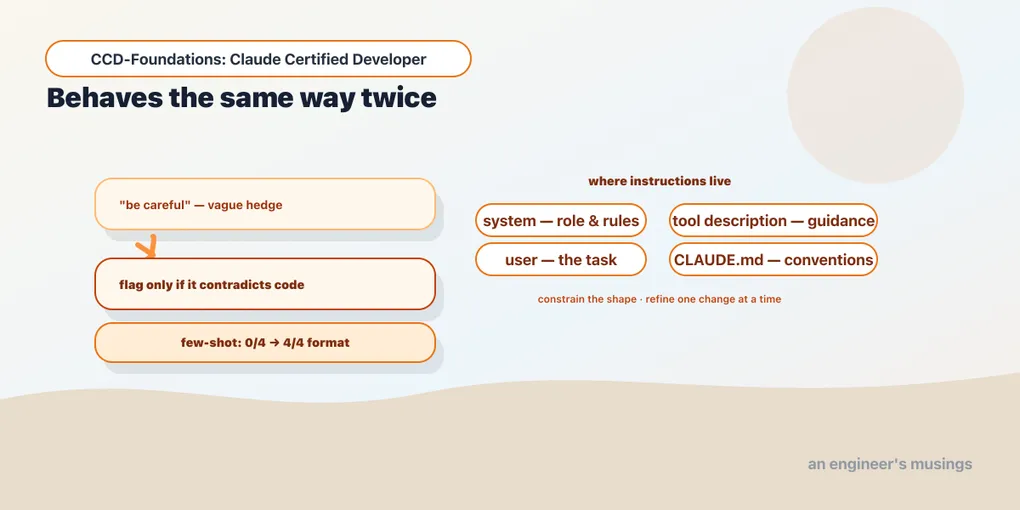
Prompt engineering has a folklore problem: the phrase conjures clever incantations and lucky wordings. For a developer shipping a Claude feature it’s something far more mundane and far more useful. It’s the discipline of writing instructions that produce consistent, reliable behavior at scale, so the same kind of input yields the same well-formed output the hundredth time as the first. The real skill is knowing which lever fixes which failure: a format that won’t hold, a judgment call the model keeps getting wrong, an instruction sitting in the wrong place. This chapter is those levers — clarity, examples, placement, constraints, refinement — grounded where they’ve been measured.
Clarity beats cleverness (and beats hedging)
The foundational lesson, established in the companion Architect work and worth restating for developers: specific, explicit criteria outperform vague instructions and outperform hedges. “Be careful,” “use good judgment,” “only report high-confidence issues” feel like they’d improve output, and they don’t. The model has no calibrated sense of its own confidence to threshold against, so a confidence hedge is noise. What works is naming the exact criterion: not “flag questionable comments” but “flag a comment only when it contradicts the code.” Precision in, precision out.
The practical version: when a prompt misbehaves, the fix is almost never more adjectives (“be more careful this time”). It’s a sharper, more concrete instruction — the specific rule, the exact format, the named category. Treat vague words in a prompt as bugs to be replaced with checkable statements.
Few-shot examples: the highest-leverage fix
When explicit instructions still produce inconsistent output — especially inconsistent format — few-shot examples are the most reliable next step. You show the model two to four worked input→output examples, and it patterns its output on them.
The measured impact: on a ticket-classification task requiring a strict output format, a zero-shot prompt produced 0 of 4 responses in the required format, while a two-example few-shot prompt produced 4 of 4. That’s not a marginal improvement; it’s the difference between a parseable pipeline and a broken one.
Here’s what makes few-shot powerful: good examples don’t just make the model copy the cases you showed. They teach it to generalize the underlying judgment to inputs you didn’t demonstrate. The most useful examples are the ambiguous ones shown with their reasoning, because they reveal the principle, not just the surface. A few examples that expose your judgment beat a long rule list you can’t make exhaustive.
Placement: system vs. user, and everywhere else
Where an instruction lives changes how it’s treated. The core split:
- System prompt: stable, always-applies instructions: the model’s role, persistent rules, output format, the tools’ context. It applies to the whole conversation (chapter 1) and is where your durable instructions belong.
- User turn: the specific task and the data for it. Per-request content goes here, framed as data (chapter 6’s trusted/untrusted boundary).
But instructions live in more than two places. The exam’s phrasing — “prompt and instruction placement across components” — points at the fuller picture. A tool’s description is an instruction the model selects by (chapter 10). A CLAUDE.md carries project instructions (chapter 6). An MCP prompt is a reusable template (chapter 11). Effective prompting means putting each instruction where it belongs: role and rules in system, task in user, tool guidance in the tool description, project conventions in CLAUDE.md. Cramming everything into one giant user message is the anti-pattern.
Output constraints
If you need output in a particular shape, say so explicitly and constrain it: don’t hope. “Respond in JSON with keys intent and confidence,” “answer in one sentence,” “reply with only the category name.” Constraints reduce the variability you then have to parse around. And when the shape must be guaranteed rather than merely requested, you escalate from a prompt constraint to a structural one: tool use or the parse helper. That’s the whole of the next chapter. Prompt-level constraints make output more likely to conform; structural ones make it certain.
Iterative refinement
Prompts are not written once; they’re refined against failures. The discipline the blueprint names:
- Refine with concrete examples and failing cases, not more adjectives. When output is wrong, add an example of the right behavior for that case, or state the specific rule it violated. This is the few-shot lesson applied to debugging a prompt.
- Change one thing at a time. A prompt is code; if you edit five things and quality moves, you don’t know which mattered. Adjust, measure, keep or revert.
- Test against a set, not a single input. A prompt that works on one example may fail on the next; you refine against a handful of representative cases (which is where evals, Arc 6, come in).
Refinement is empirical: you have a behavior you want, you observe the gap, you make the smallest concrete change that closes it, and you re-test. “Prompt adjustment” is not an art here; it’s a tight edit-measure loop.
A word on input sanitization
The blueprint lists input sanitization under prompt engineering. It’s the design habit from chapter 6 seen from the prompt side: user- or tool-supplied text must be kept as data, never concatenated into your instruction string where it could be read as a command. system=f"Summarize: {user_text}" lets the user’s text become instruction; pass it as a separate, framed block instead. This is the entry point to Arc 6’s prompt-injection defenses. At the prompt-engineering level the rule is simply: untrusted content is data, and your prompt structure must keep it that way.
Final thoughts
Prompt engineering for a developer is repeatability, not wordcraft. Clarity — concrete criteria, not hedges — is the baseline. Few-shot examples are the highest-leverage fix (0/4 to 4/4 on format), and they generalize judgment, not just copy cases. Put each instruction where it belongs: role in system, task in user, guidance in tool descriptions and CLAUDE.md. Constrain the output shape explicitly, and refine empirically with concrete failing cases, one change at a time. Keep untrusted input as data. Do these and your prompts stop being incantations and start being specifications the model follows the same way twice.
Next: context and structured output — keeping the context window clean, and guaranteeing the output shape instead of hoping for it.
Comments