Carry a Result through reduce
A sum gives us the final order amount.
A sum gives us the final order amount. A running-total report needs the amount after each line: 10, then 22, then 32. Each new result depends on what has already been accumulated. That dependency is where a fold becomes useful.
reduce: many in, one out
reduce walks the array carrying a running result, the accumulator, and returns whatever the accumulator ends up as. The lambda’s parameters are, in this order, the current item and the accumulator:
Example 95 — Seed a running sum.
%dw 2.0
output application/json
---
[10, 20, 30] reduce (item, accumulator = 0) -> accumulator + item
Result:
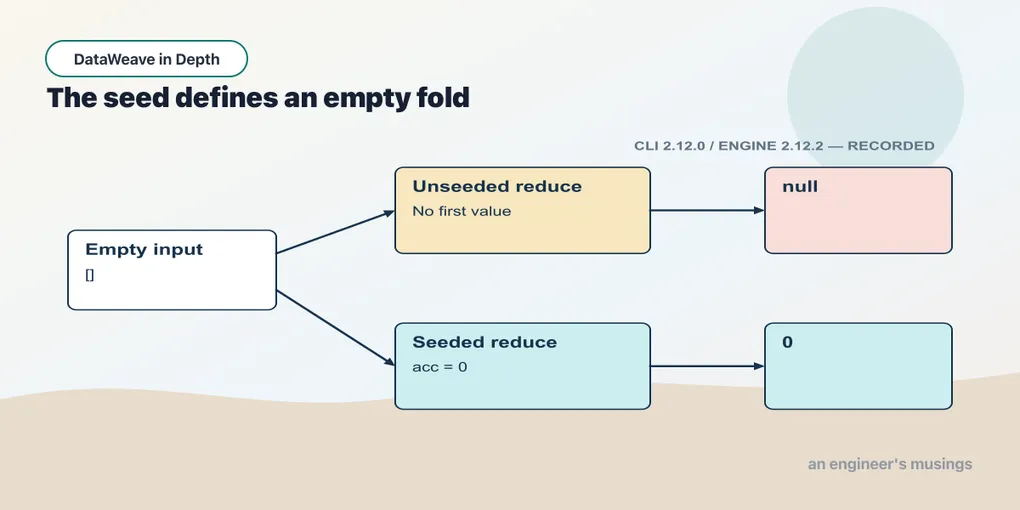
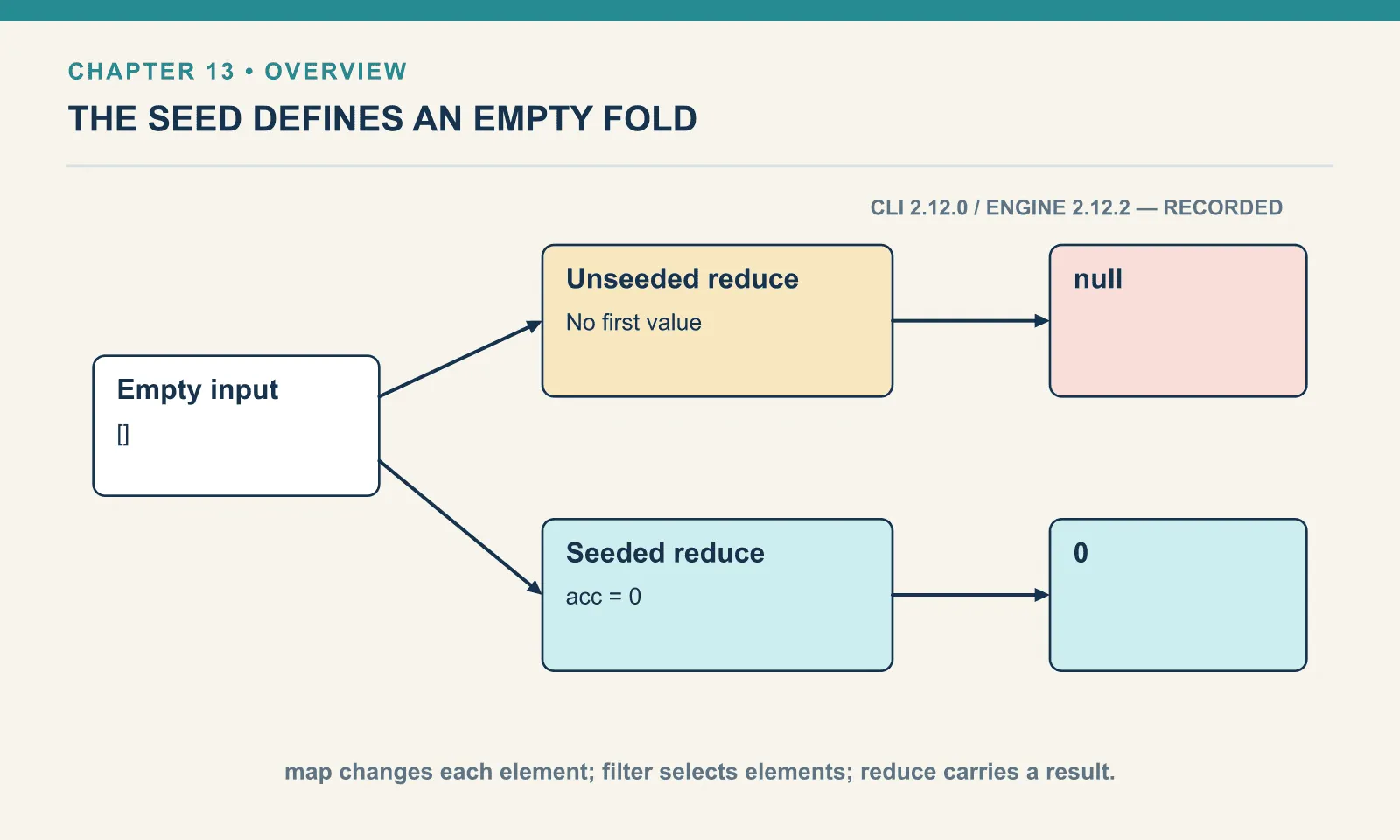
60The accumulator starts at zero. The three steps produce 10, then 30, then 60; the final value is the result of the fold. The seed also gives an empty input a defined result of zero.
The item remains the first parameter, but the second now carries the accumulated result. In map and filter that position held the index. With positional shorthand, $ still means the item while $$ now means the accumulator. A callback copied from one operation to another can therefore keep compiling while referring to a different value.
The positional trap, shown
For a sum it does not matter, since $ + $$ and $$ + $ are the same number. For anything that is not commutative, the swap produces a wrong answer with no error. Join the SKUs into a comma-separated list, both ways:
Example 96 — Distinguish the item from the accumulator.
Input payload — order.json:
{
  "orderId": "A-1001",
  "customer": "Dana",
  "items": [
    { "sku": "PEN-01", "price": 2.5, "qty": 4 },
    { "sku": "PAD-22", "price": 6.0, "qty": 2 },
    { "sku": "CLP-08", "price": 1.0, "qty": 10 }
  ]
}
%dw 2.0
output application/json
---
{
accThenItem: payload.items.sku reduce ($$ ++ "," ++ $),
itemThenAcc: payload.items.sku reduce ($ ++ "," ++ $$)
}{
"accThenItem": "PEN-01,PAD-22,CLP-08",
"itemThenAcc": "CLP-08,PAD-22,PEN-01"
}The second string has the right SKUs in reverse order, so a test that checks only membership will pass. I name the parameters every time I write reduce. (item, acc) makes the accumulator’s position visible to a reviewer; $ and $$ conceal it.
The seed, and why you almost always want one
You can give the accumulator a starting value, the seed, with a default on its parameter. Here are the four combinations that matter, in one script:
Example 97 — Compare seeded and unseeded folds.
Use order.json as payload, as above.
%dw 2.0
output application/json
---
{
  seeded:   [10, 20, 30] reduce (item, acc = 0) -> acc + item,
  unseeded: [10, 20, 30] reduce (item, acc) -> acc + item,
  emptySeeded:   [] reduce (item, acc = 0) -> acc + item,
  emptyUnseeded: [] reduce (item, acc) -> acc + item
}
{
"seeded": 60,
"unseeded": 60,
"emptySeeded": 0,
"emptyUnseeded": null
}The two non-empty cases both return 60, hiding their different starting points. With a seed, the accumulator starts at 0 and reduce visits all three items: 0 + 10, then + 20, then + 30. Without a seed, reduce uses the first element as the accumulator’s initial value and starts iterating from the second. So acc begins at 10, then 10 + 20, then + 30. Same answer, different route — and the route only shows when something about the array changes.
The third and fourth lines are the empty-array case. With no seed and nothing to seed from, reduce has no accumulator to return, so it returns null. Adding = 0 gives the empty case a defined answer.
The empty-order case belongs beside the ordinary order in a test. A non-empty sum can hide the missing seed because both versions produce the same number; an empty input exposes whether the transform promises 0 or returns null. Checking both keeps that decision in the script that owns the total.
The seed sets the accumulator’s type
A seed also matters when the array is non-empty: it determines the accumulator’s initial shape. When the result is a different shape from the elements, the unseeded first element is the wrong kind of thing. Build that comma-separated SKU list again, this time from the item objects rather than the SKU strings. Leave the seed off:
Example 98 — An accumulator starts with the wrong type.
Use order.json as payload, as above.
%dw 2.0
output application/json
---
payload.items reduce (item, acc) -> acc ++ "," ++ item.sku
[ERROR] Error while executing the script:
[ERROR] You called the function '++' with these arguments:
1: Object ({sku: "PEN-01",price: 2.5,qty: 4})
2: String (",")
But it expects one of these combinations:
(Array, Array)
(Date, Time)
(Date, LocalTime)
(Date, TimeZone)
(LocalDateTime, TimeZone)
(LocalTime, Date)
(LocalTime, TimeZone)
(Object, Object)
(String, String)
(Time, Date)
(TimeZone, LocalDateTime)
(TimeZone, Date)
(TimeZone, LocalTime)
4| payload.items reduce (item, acc) -> acc ++ "," ++ item.sku
^^
Trace:
at 098-reduce-unseeded-type::++ (line: 4, column: 41)
at 098-reduce-unseeded-type::reduce (line: 4, column: 48)
at 098-reduce-unseeded-type::main (line: 4, column: 15) at:
4| payload.items reduce (item, acc) -> acc ++ "," ++ item.sku
^^The first argument in the error, Object ({sku: "PEN-01", ...}), is the accumulator. It started as the first item, but this expression needs a String, and ++ has no overload for an object and a string. Seeding with "" repairs the type and lets the script run. It also produces a leading comma: the accumulator’s type is now right, but the separator logic still needs work. For this task, joinBy handles the separator directly.
Building an object from a list
An orders pipeline often needs a lookup keyed by SKU. Each input element is an item object, while the result is a single lookup object. Starting with {} gives the fold that result shape:
Example 99 — Build an object with a seeded fold.
Use order.json as payload, as above.
%dw 2.0
output application/json
---
payload.items reduce (item, acc = {}) -> acc ++ { (item.sku): item.qty }
{
"PEN-01": 4,
"PAD-22": 2,
"CLP-08": 10
}Each step merges a one-key object onto the accumulator with ++. The parentheses around item.sku make the key dynamic — the expression is evaluated and its value becomes the key, instead of the literal text item.sku. Chapter 10 introduced this dynamic-key syntax.
Now drop the seed:
Example 100 — Try building an object without a seed.
Use order.json as payload, as above.
%dw 2.0
output application/json
---
payload.items reduce (item, acc) -> acc ++ { (item.sku): item.qty }
{
"sku": "PEN-01",
"price": 2.5,
"qty": 4,
"PAD-22": 2,
"CLP-08": 10
}Here ++ accepts both operands, so the missing seed produces a malformed lookup without an error. The first item’s three keys remain in the result beside the two correctly built lookups, and PEN-01 has no entry at all. I find this failure worse than the type error: the output is still an object and may pass a loose schema. Starting with {} establishes the intended lookup shape before any item contributes to it.
A fold no stock function does
A map processes individual items without any running state, and sum returns only the final number. A sequence of running totals needs a custom accumulator, because each output depends on the previous result. Seed with an empty array and append to it:
Example 101 — Keep a history of running totals.
Use order.json as payload, as above.
%dw 2.0
output application/json
---
payload.items reduce (item, acc = []) -> acc ++ [ (acc[-1] default 0) + item.price * item.qty ]
[
10,
22,
32
]acc[-1] is the last element so far. default 0 covers the first step, when the accumulator is still empty and acc[-1] is null. This is the same null fallback introduced in chapter 4. The pattern generalises — whenever the next value depends on the previous result, the previous result lives in the accumulator.
Flattening, and when not to reduce
An array accumulator can flatten nested arrays by starting with [] and concatenating each inner array. Comparing that fold with the library’s flatten shows how much of the mechanism the caller needs to spell out:
Example 102 — Flatten arrays with a fold.
Use order.json as payload, as above.
%dw 2.0
output application/json
---
{
  byHand: [[1, 2], [3, 4], [5]] reduce (item, acc = []) -> acc ++ item,
  stock:  flatten([[1, 2], [3, 4], [5]])
}
{
"byHand": [
1,
2,
3,
4,
5
],
"stock": [
1,
2,
3,
4,
5
]
}The outputs are identical, and flatten states the operation in its name. Although these operations can be expressed as folds, sum, flatten, groupBy, joinBy and distinctBy make their intent visible without a custom accumulator. The named version reads better, it cannot get the seed wrong, and it cannot swap $ and $$.
Arrays: the folds reduce was doing by hand
The comparison above recommended named operations when they express the intended result without exposing an accumulator. dw::core::Arrays supplies operations for totaling, counting and splitting Dana’s three items after the inventory service adds a stock flag:
Example 103 — Sum, count and partition by a predicate.
Input payload — order.json:
{ "orderId": "A-1001", "customer": "Dana", "coupon": null, "tags": ["gift", null, "rush"],
  "items": [
    { "sku": "PEN-01", "price": 2.5, "qty": 4, "note": null },
    { "sku": "PAD-22", "price": 6.0, "qty": 2 },
    { "sku": "CLP-08", "price": 1.0, "qty": 10 }
  ] }
%dw 2.0
import sumBy, countBy, partition from dw::core::Arrays
output application/json
var items = [
{ sku: "PEN-01", price: 2.5, qty: 4, inStock: true },
{ sku: "PAD-22", price: 6.0, qty: 2, inStock: false },
{ sku: "CLP-08", price: 1.0, qty: 10, inStock: true }
]
---
{
revenue: items sumBy (i) -> i.price * i.qty,
backorder: items countBy (i) -> not i.inStock,
split: items partition (i) -> i.inStock
}{
"revenue": 32,
"backorder": 1,
"split": {
"success": [
{
"sku": "PEN-01",
"price": 2.5,
"qty": 4,
"inStock": true
},
{
"sku": "CLP-08",
"price": 1,
"qty": 10,
"inStock": true
}
],
"failure": [
{
"sku": "PAD-22",
"price": 6,
"qty": 2,
"inStock": false
}
]
}
}sumBy totals a computed column with no accumulator to seed. countBy counts the elements for which the predicate is true. partition splits by a test into success and failure — those two key names are fixed, whatever the test is about. The valid-rows-here, rejects-there split of an ingest is one partition call.
More of the module, run on the order itself:
Example 104 — Check and select array members.
Use order.json as payload, as above.
%dw 2.0
import * from dw::core::Arrays
output application/json
var items = payload.items
---
{
  sumOfNothing:  [] sumBy (i) -> i.price,
  countOfNothing: [] countBy (i) -> true,
  allPositive:   items every (i) -> i.qty > 0,
  anyBulk:       items some (i) -> i.qty >= 10,
  firstBulk:     items firstWith (i) -> i.qty >= 10,
  noneFound:     items firstWith (i) -> i.qty > 100,
  skuIndex:      items indexOf { sku: "PAD-22", price: 6.0, qty: 2 },
  head:          items take 1
}
{
"sumOfNothing": 0,
"countOfNothing": 0,
"allPositive": true,
"anyBulk": true,
"firstBulk": {
"sku": "CLP-08",
"price": 1.0,
"qty": 10
},
"noneFound": null,
"skuIndex": 1,
"head": [
{
"sku": "PEN-01",
"price": 2.5,
"qty": 4,
"note": null
}
]
}The first two lines are the reason to prefer these over a hand-written fold — on an empty array they return 0, because the seed is built in. every and some are the quantifiers. firstWith is filter followed by [0] without the intermediate array, and returns null when nothing matches. indexOf finds an element by structural equality, which is why the whole object had to be spelled out to find PAD-22.
CLP-08’s price printed as 1.0 here and as 1 in the previous script. Do not build a rule on that. The same filter run as the whole script body printed 1, although it copies the value straight from the JSON, while the identical expression inside an object field printed 1.0. Whether the JSON writer keeps a trailing .0 is not something this book could pin to a rule, so treat 1 and 1.0 as the same number and format explicitly when the digits matter.
Two ways an Arrays call fails
sumBy on a field the items do not have fails loudly. Its diagnostic shows the seeded reduce used inside the library. payload.items sumBy (i) -> i.discount stops with You called the function '+' with these arguments: 1: Null (null) 2: Number (0), followed by every combination + does accept, and a trace into the library’s own line 293: ($ reduce (item: T, carry: Number = 0) -> numberSelector(item) + carry). There is the source again — sumBy is a reduce with carry: Number = 0, and null + 0 has no overload.
countBy with a predicate that returns a number fails the way chapter 13’s filter did: payload.items countBy (i) -> i.qty stopped with Invalid if condition type. Expecting type Boolean but got Number(4), because if will not coerce. Write the comparison you mean.
When to reach for reduce
The running total and the lookup show how reduce carries a custom result from item to item. The opening order total uses the same mechanism with a numeric seed:
Example 105 — Calculate an order total with reduce.
Use order.json as payload, as above.
%dw 2.0
output application/json
---
{
  orderId: payload.orderId,
  total: payload.items reduce (item, acc = 0) -> acc + (item.price * item.qty)
}
{
"orderId": "A-1001",
"total": 32
}Run it against A-1007, the empty order from the top of the chapter, and the total is 0 rather than null. That = 0 supplies the accumulator seed the opening script was missing.
I would go one step further than “seed it”. For a plain total, sum(payload.items map $.price * $.qty) says the same thing with no accumulator to get wrong. It returns 0 on an empty array without you having to remember why. reduce is for when sum will not do.
Exercises
Count the bulk lines two ways. Count the items in A-1001 with a quantity of four or more, once with filter and sizeOf, and once with reduce alone. Run both. Which one would you leave in a script a colleague maintains, and why does the reduce version need a seed here even though the array is not empty?
Show answer
Example 106 — Count qualifying items with a fold.
Use order.json as payload, as above.
%dw 2.0
output application/json
---
{
  viaFilter: sizeOf(payload.items filter (item) -> item.qty >= 4),
  viaReduce: payload.items reduce (item, acc = 0) -> if (item.qty >= 4) acc + 1 else acc
}
{
"viaFilter": 2,
"viaReduce": 2
}The filter version is the one to keep: it says “count the ones that pass”. The reduce version needs = 0 because the accumulator is a count, not an item. Unseeded, it would start as the first item object, and acc + 1 would fail on an object.
The most valuable line. Use reduce to return the single item whose price * qty is largest. Run it. Does this one need a seed? What happens on an empty order, and is that acceptable?
Show answer
Example 107 — Choose the largest line amount.
Use order.json as payload, as above.
%dw 2.0
output application/json
---
payload.items reduce (item, acc) -> if (item.price * item.qty > acc.price * acc.qty) item else acc
{
"sku": "PAD-22",
"price": 6,
"qty": 2
}This is the rare fold where the unseeded form is right. The accumulator is an item, so starting from the first item is exactly what you want, and there is no neutral “zero item” to seed with. On an empty order it returns null, and here that is the honest answer — there is no most valuable line. Whether the downstream system can take a null is a separate question. Chapter 4’s default is how you decide what it gets instead.
Before keeping a custom fold, describe its accumulator after each input. Its seed establishes the empty case and the starting shape. If a library operation already expresses the result, use it and keep the custom state out of the calling script.
Comments