Kotlin Smart Casts: Stop Telling the Compiler What It Already Knows
How smart casts remove the check-then-cast tax, the control-flow analysis behind them, and the exact stability rules — local val vs var, the mutable-property refusal, and the open-or-custom-getter error — that decide when they kick in.
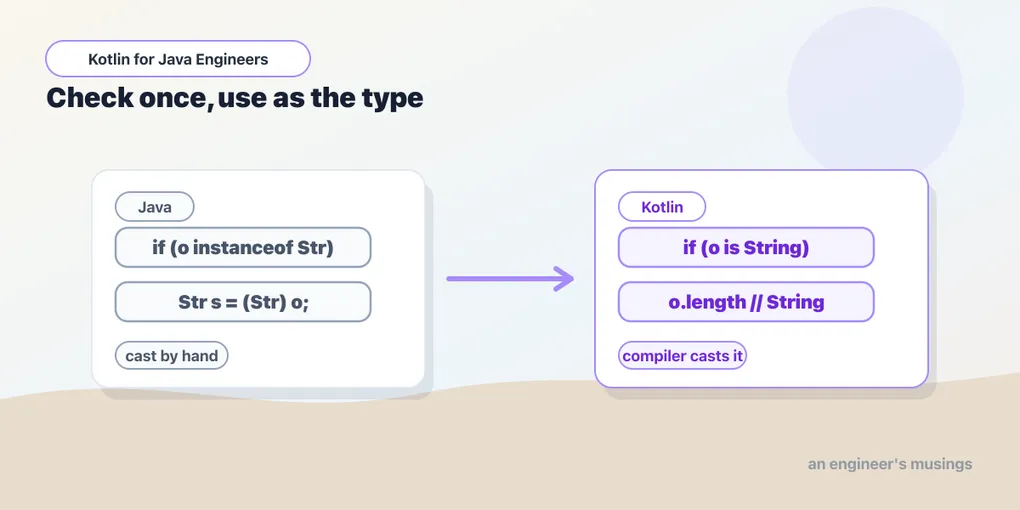
If you’re coming from Java, you know the dance: check whether something is a certain type, then cast it before using it. Kotlin watches that pattern and quietly intervenes. Smart casts let the compiler treat a value as a more specific type once it has enough information to prove the move is safe. It isn’t flashy. It just removes a small, constant tax from everyday code — the kind of friction you stopped noticing only because you got used to paying it.
This is the fifth chapter, following when, which already leaned on smart casts in its type branches. Here we look at the mechanism directly, and at the rules that govern when it fires. Everything was run against Kotlin 2.4.10.
The Java pattern, and the Kotlin one
In Java, an Object reference starts a familiar two-step, which modern Java has since tightened with pattern-matching instanceof:
// classic
if (value instanceof String) {
    String text = (String) value;
    System.out.println(text.length());
}
// Java 16+
if (value instanceof String text) {
    System.out.println(text.length());
}
Here’s the Kotlin:
fun printLength(value: Any) {
    if (value is String) {
        println(value.length)      // value is already a String here
    }
}
Inside the if, the compiler knows value is a String. You don’t write val text = value as String — the check is the cast. Kotlin’s version isn’t dramatically shorter than Java 16’s. But the same idea shows up in far more places across the language. That’s the point: smart casting is one mechanism that null safety, when, and control-flow analysis all reuse.
is, !is, and following control flow
is is the type check, !is the negation. The crucial property is that a smart cast follows control flow, not block boundaries. After an early return on the negative case, everything below knows the type:
fun printUppercase(value: Any) {
    if (value !is String) return
    println(value.uppercase())     // value is String from here to the end
}
The compiler reasons about reachability. If the only way to get past a !is guard is to be a String, then past that guard you are a String. This is why guard clauses feel so natural in Kotlin — each one permanently narrows the type for the rest of the function.
Null checks are smart casts too
Smart casts aren’t only about types. String? and String are different types. A null check narrows one to the other (the null-safety chapter is the full story):
fun printLength(name: String?) {
    if (name != null) {
        println(name.length)       // name is String, not String?
    }
}
The same control-flow analysis powers both. Checking != null proves non-nullability exactly the way is String proves the type. The compiler carries either fact forward until something could invalidate it.
Composing with && and ||
Smart casts compose with the logical operators, because && and || short-circuit and the compiler knows the order of evaluation:
if (value is String && value.isNotEmpty()) {
    println(value.uppercase())     // proven String before isNotEmpty() runs
}
|| works in its mirror-image shape — narrowing what survives the exit:
fun example(value: Any) {
    if (value !is String || value.isEmpty()) return
    println(value.uppercase())     // past here: a non-empty String
}
By the time value.isEmpty() is evaluated, value must already be a String, or the || would have short-circuited. Past the whole guard, the surviving value is a non-empty string. The compiler is tracing the flow of your program, not reading one line at a time.
The stability rule: what the compiler can trust
This is where smart casts stop working, and the reasons aren’t obvious. A smart cast is only sound if the value can’t change between the check and the use. Kotlin calls such values stable, and stability has precise rules.
A local val is the safest case — it can’t be reassigned, so a check about it stays true:
val local = value
if (local is String) println(local.length)   // always fine
A local var can be smart cast too, but only as long as nothing reassigns it between the check and the use. Reassign it, and the compiler drops the cast at exactly that point:
var value: Any = "Kotlin"
if (value is String) {
    value = 42
    // value.length here would NOT compile — the var moved
}
That’s not the compiler being fussy; it’s refusing to pretend something is safe after you made it unsafe.
Where smart casts refuse: mutable and computed properties
The surprise for Java engineers is that smart casts do not work on a mutable property, even after an explicit null check:
class User(var name: String?)

fun printUserName(user: User) {
    if (user.name != null) {
        println(user.name.length)   // does NOT compile
    }
}
Why? name is a var on an object. Between the check and the use, another method, another thread, or a custom getter could change it. The compiler can’t prove the value it checked is the value it’ll read. The same refusal applies to a val with a custom or open getter, and the error message says so exactly:
error: smart cast to 'String' is impossible, because 'value' is a property
that has an open or custom getter.
A property with a custom getter is really a method call in disguise. Two reads can return two different values, so “I checked it a line ago” proves nothing. An open val can be overridden by a subclass with just such a getter, so it’s tarred with the same brush. The fix in every case is to copy into a local val, giving the compiler something it can trust:
fun printUserName(user: User) {
    val name = user.name           // stable local snapshot
    if (name != null) {
        println(name.length)       // fine
    }
}
This becomes a reflex: when you want the compiler’s help, hand it a stable value. It’s also why ?.let { } exists. For the property case where you can’t or don’t want to introduce a named local, the null-safety chapter shows the ?.let form that sidesteps the whole stability question.
Smart casts vs explicit casts
Kotlin still ships explicit casts for when you genuinely know more than the compiler:
val text = value as String          // throws ClassCastException if it isn't
val text = value as? String         // returns null if it isn't
val length = (value as? String)?.length
A smart cast is different in kind: it happens because the compiler proved something from your code, not because you asserted it. The rule of thumb: reach for smart casts first; use as only when you know something the compiler provably can’t; use as? when failure is a real case you want to fold into an Elvis fallback (value as? String ?: default).
A practical example
Handling events off a loosely-typed API pulls it all together:
fun handleEvent(event: Any) = when (event) {
    is String       -> println("Message: ${event.trim()}")
    is Int          -> println("Code: $event")
    is Map<*, *>    -> println("Payload keys: ${event.keys}")
    else            -> println("Unknown event")
}
Not one manual cast. Each branch uses the value as the type it just proved. That’s the whole idea: your code states what it means, and the compiler carries the knowledge forward.
Final thoughts
Smart casts are a small feature that compounds. They’re the thread tying much of Kotlin together. is/!is, null safety, when, control-flow analysis, and the standing preference for immutable locals all reinforce the same move: check the type, check for null, return early, and let the compiler hold onto what it learned. The stability rules are the part worth carrying. A smart cast is a promise the compiler will only make about a value that can’t change under it. That’s precisely why a local val gets help that a mutable property doesn’t. When a smart cast won’t fire, the question to ask isn’t “why is the compiler being difficult” but “what could change this value between here and there.” The answer is usually a one-line local away.
Next: null safety — the other place the compiler tracks what it has already proven, and the feature smart casts quietly power the moment you check a value against null.
Practice: reinforce this with the companion workbook — short, click-to-reveal problems.
Comments