Project Memory: CLAUDE.md, the Hierarchy, and Path-Specific Rules
What CLAUDE.md is and why Claude Code layers it into a hierarchy — the user, project, and directory levels, why user-level config never reaches your team, @import and .claude/rules/ for modular organization, and glob-scoped rules that load only for the files they apply to.
The previous chapter was about configuring what an agent can do — its tools. This one is about telling it how your project does things: the conventions, the architecture rules, the “we always do it this way here” that a capable agent still has no way of knowing until you tell it. That’s what CLAUDE.md is for. It opens Domain 3, Claude Code Configuration & Workflows, which is 20% of the exam. Everything here is configuration I can confirm against the live tool rather than a live model, so there are no ⚠️ flags. These are checkable facts about how Claude Code loads context.
What CLAUDE.md is
Claude Code reads instructions from files named CLAUDE.md and folds them into its context automatically, before it does anything on your project. Think of it as project memory. These are the standing instructions that make Claude behave like someone who already works on your codebase rather than a stranger seeing it for the first time. Your language and framework, your architecture rules, the commands to build and test, the conventions a linter wouldn’t catch — all of it goes here. And all of it is in scope every time Claude works in that project.
The problem CLAUDE.md solves is that a model, however capable, starts every session without your context. It doesn’t know you deploy with a particular script, that a certain directory is generated and shouldn’t be edited, or that your team spells configuration a specific way. Left to guess, it guesses reasonably and is reasonably often wrong. CLAUDE.md is where you write those things down once so you never have to say them again.
But a single file quickly runs into a problem of its own: not every instruction has the same audience. Some conventions belong to the whole team, some to one folder, some are just your personal habits. Cramming all of them into one file means everyone gets everyone’s — and that’s the problem the hierarchy exists to solve.
Why a hierarchy — different instructions, different reach
Consider three instructions. “This project is TypeScript with strict null checks” should apply to everyone, always. “Files under services/auth/ follow the legacy error-handling pattern” should apply only in that folder. “I like my explanations terse” is a personal preference nobody else should inherit. Those three want three different reaches: the whole team, one subtree, and just you.
That’s exactly what the hierarchy gives you. Rather than one file trying to serve every audience, CLAUDE.md exists at levels, each with a natural scope, and Claude assembles the ones that apply. Get an instruction’s level right and it reaches precisely the right people and files. Get it wrong and you either leak a personal quirk to the team or strand a team convention on your own machine. The hierarchy isn’t bureaucracy — it’s the mechanism that lets a shared convention and a private preference coexist without stepping on each other.
The levels, and how they combine
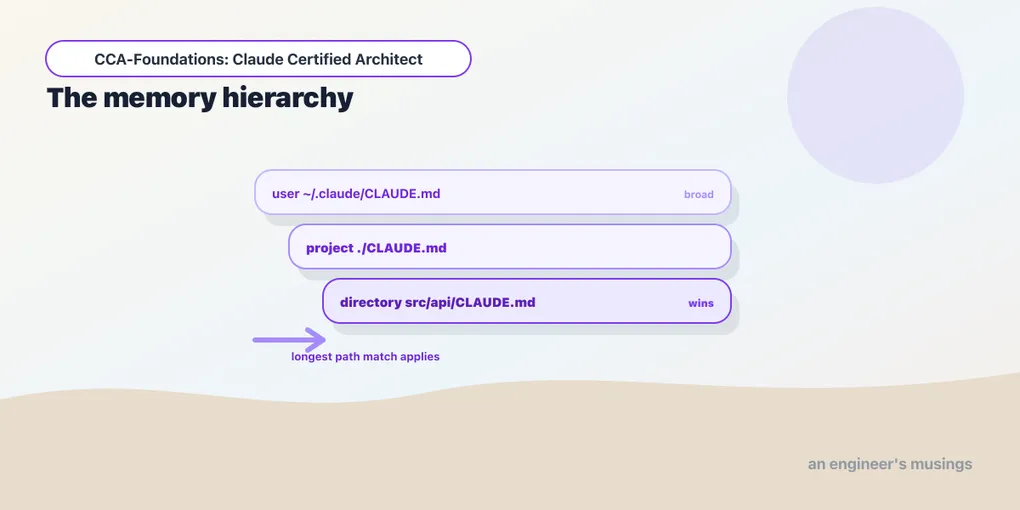
Claude Code assembles its instructions from CLAUDE.md files at three levels:
- User:
~/.claude/CLAUDE.md. Your personal instructions, applied to every project you work on. - Project:
CLAUDE.mdat the repo root, or.claude/CLAUDE.md. Committed to version control, so it’s shared with the whole team. - Directory: a
CLAUDE.md(or.claude/CLAUDE.md) inside a subdirectory, scoping conventions to that part of the tree. For nested files, the longest-matching path wins — a rule inpackages/api/CLAUDE.mdtakes precedence over the root when you’re editing underpackages/api/.
The most-tested consequence is a diagnostic one: user-level config is not shared with your team. Instructions in ~/.claude/CLAUDE.md live on your machine and never travel through version control. So take the classic exam scenario — “a new teammate isn’t getting the project’s conventions.” It’s almost always because those conventions were put in user-level config instead of the project CLAUDE.md. The fix is to move them into the committed project file. If a convention needs to reach everyone, it has to be in the repo; if it’s a personal preference, user-level is where it belongs. Getting that placement right is the whole point of the hierarchy.
Keeping CLAUDE.md modular
A CLAUDE.md that grows into a monolith is hard to maintain and dilutes the instructions that matter. Two mechanisms keep it modular:
@import references an external file, so CLAUDE.md can pull in a standards file rather than inlining it:
# Project conventions
@import ./standards/api-conventions.md
@import ./standards/testing.md
This lets each package’s CLAUDE.md selectively include the standards relevant to its domain, so a maintainer curates which standards apply where instead of maintaining one giant file.
.claude/rules/ is a directory of topic-specific rule files — testing.md, api-conventions.md, deployment.md — as an alternative to a single sprawling CLAUDE.md. Splitting by topic keeps each file focused and lets you reason about one concern at a time.
And when behavior is inconsistent across sessions, the /memory command shows which memory files are actually loaded. It’s the diagnostic for “why is Claude ignoring my convention?” Usually the file you expected isn’t in scope, and /memory is how you confirm it.
Path-specific rules: conventions that load themselves
The hierarchy so far scopes conventions by location — this folder, that subtree. But some conventions don’t live in one place; they follow a file type scattered across the tree. Every test file, wherever it sits, wants the same testing conventions. Every Terraform file wants the same infrastructure rules. A directory-level CLAUDE.md can’t express that, because the files aren’t in one directory. This is the problem path-specific rules solve, and it’s the sharper tool in the domain.
A .claude/rules/ file with YAML frontmatter paths glob patterns loads only when you’re editing a matching file:
---
paths: ["**/*.test.tsx"]
---
Test conventions: use React Testing Library, one describe block per component,
no snapshot tests for interactive components.
Now those test conventions load only when Claude is editing a .test.tsx file — and it doesn’t matter where in the codebase that file lives. Two payoffs the exam draws on:
- Reduced context and token usage. The rule isn’t in scope while editing unrelated files, so it doesn’t consume context or distract — context discipline applied to configuration itself.
- It spans directories. A directory-level CLAUDE.md governs one subtree; a glob-scoped rule governs a file type wherever it lives. When your test files are spread throughout the codebase, a
paths: ["**/*.test.tsx"]rule reaches all of them, which a per-directory CLAUDE.md never could.
The exam-ready decision: use a path-specific rule when a convention follows a file type across the tree; use a directory CLAUDE.md when it follows a location. Terraform conventions (paths: ["terraform/**/*"]) that also need to reach a stray .tf file elsewhere are a rule’s job. Conventions for everything under services/auth/ are a directory CLAUDE.md’s job.
Choosing what goes where
Pulling the levels together into the judgment the exam asks for:
- A universal, always-relevant standard (the project’s language, its architecture rules) → project CLAUDE.md, so everyone gets it every time.
- A file-type convention that spans directories → a
.claude/rules/file with apathsglob, so it loads only when relevant. - A location-specific convention → a directory CLAUDE.md in that subtree.
- A personal preference → user-level
~/.claude/CLAUDE.md, kept off the team.
The failure modes are all misplacements. A team convention stranded in user config, so nobody else gets it. A niche file-type rule shoved into the always-loaded project CLAUDE.md, so every unrelated edit pays the context bloat. A monolith that should have been split into .claude/rules/. Placement is the skill.
Final thoughts
CLAUDE.md is project memory, and because different instructions have different reach, it’s a hierarchy — user, project, directory, longest-match-wins. Its most-tested trap is that user-level config never reaches your team, so shared conventions belong in the committed project file. @import and .claude/rules/ keep configuration modular, and /memory tells you what’s actually loaded. Path-specific rules with paths globs load conventions only for the file types they govern, spanning directories a per-folder file can’t. The whole domain is one skill wearing different hats: put each instruction at the level where exactly the right people and files see it, and nowhere else.
Next: slash commands, skills, and iterative refinement — the reusable workflows you define and the techniques for steering Claude toward the output you want.
Comments