Build and Verify the Order Report
The shipping partner sends a namespaced XML batch.
The shipping partner sends a namespaced XML batch. The warehouse needs a JSON report containing normalized orders, category revenue and a batch total. We will inspect the source, normalize it into ordinary objects, calculate the report, and check the result.
The contract is deliberately specific: prices are USD; slash-separated dates are US month-first; an absent line collection means an empty order; an absent note should be omitted from the final receipt. The timestamp input contributes its calendar date. Different source contracts require explicit changes at normalization.
Example 232 — Inspect the batch shape.
Input payload — inspect-the-batch-shape-input.xml:
<?xml version="1.0" encoding="UTF-8"?>
<ord:orderBatch xmlns:ord="http://shipping.acme.com/orders" batchId="B-2026-06-20">
  <ord:order id="A-1001">
    <ord:placedAt>2026-06-14</ord:placedAt>
    <ord:customer tier="gold">Dana</ord:customer>
    <ord:note><![CDATA[Leave at <side door> & ring twice]]></ord:note>
    <ord:line>
      <ord:sku>PEN-01</ord:sku>
      <ord:category>stationery</ord:category>
      <ord:price currency="USD">2.50</ord:price>
      <ord:qty>4</ord:qty>
    </ord:line>
    <ord:line>
      <ord:sku>PAD-22</ord:sku>
      <ord:category>paper</ord:category>
      <ord:price currency="USD">6.00</ord:price>
      <ord:qty>2</ord:qty>
    </ord:line>
    <ord:line>
      <ord:sku>CLP-08</ord:sku>
      <ord:category>stationery</ord:category>
      <ord:price currency="USD">1.00</ord:price>
      <ord:qty>10</ord:qty>
    </ord:line>
  </ord:order>
  <ord:order id="A-1002">
    <ord:placedAt>06/16/2026</ord:placedAt>
    <ord:customer tier="standard">Ravi</ord:customer>
    <ord:line>
      <ord:sku>PAD-22</ord:sku>
      <ord:category>paper</ord:category>
      <ord:price currency="USD">6.00</ord:price>
      <ord:qty>1</ord:qty>
    </ord:line>
  </ord:order>
  <ord:order id="A-1003">
    <ord:placedAt>2026-06-18T09:30:00Z</ord:placedAt>
    <ord:customer tier="gold">Mei</ord:customer>
    <ord:line>
      <ord:sku>PEN-01</ord:sku>
      <ord:category>stationery</ord:category>
      <ord:price currency="USD">2.50</ord:price>
      <ord:qty>12</ord:qty>
    </ord:line>
    <ord:line>
      <ord:sku>CLP-08</ord:sku>
      <ord:category>stationery</ord:category>
      <ord:price currency="USD">1.00</ord:price>
      <ord:qty>3</ord:qty>
    </ord:line>
  </ord:order>
</ord:orderBatch>
%dw 2.0
ns ord http://shipping.acme.com/orders
output application/json
---
(payload.ord#orderBatch.*ord#order default []) map (order) -> {
id: order.@id,
skus: (order.*ord#line default []) map (line) -> line.ord#sku
}Result:
[
  {
    "id": "A-1001",
    "skus": [
      "PEN-01",
      "PAD-22",
      "CLP-08"
    ]
  },
  {
    "id": "A-1002",
    "skus": [
      "PAD-22"
    ]
  },
  {
    "id": "A-1003",
    "skus": [
      "PEN-01",
      "CLP-08"
    ]
  }
]
The first result checks membership before any money or dates are converted. The batch has three orders with three, one and two lines. The one-line order remains an array, and the default gives an empty array when no line exists.
Compare these identifiers and SKUs directly with the XML fixture. A total can accidentally agree even after lines have been lost or duplicated; membership is an independent check.
Example 233 — The feed normalization and report module.
Module source; import it from the following scripts.
%dw 2.0
ns ord http://shipping.acme.com/orders
import fail from dw::Runtime
fun parseDate(s: String): Date =
  if (s matches /\d{4}-\d{2}-\d{2}T.*/) (s as DateTime) as Date
  else if (s matches /\d{4}-\d{2}-\d{2}/) s as Date {format: "yyyy-MM-dd"}
  else s as Date {format: "MM/dd/yyyy"}
fun normalizeLine(line) = {
  sku: line.ord#sku,
  category: line.ord#category,
  price: if (line.ord#price.@currency == "USD") line.ord#price as Number else fail("Expected USD price"),
  qty: line.ord#qty as Number
}
fun normalizeOrder(order) = {
  id: order.@id,
  placedAt: parseDate(order.ord#placedAt) as String {format: "yyyy-MM-dd"},
  customer: order.ord#customer,
  tier: order.ord#customer.@tier,
  note: order.ord#note,
  lines: (order.*ord#line default []) map (line) -> normalizeLine(line)
}
fun normalizeBatch(batch) = {
  batchId: batch.@batchId,
  orders: (batch.*ord#order default []) map (order) -> normalizeOrder(order)
}
fun lineTotal(line) = line.price * line.qty
fun receipt(order) = do {
  var lines = order.lines map (line) -> line ++ {lineTotal: lineTotal(line)}
  ---
  {
    id: order.id, placedAt: order.placedAt, customer: order.customer,
    (vip: true) if (order.tier == "gold"),
    (note: order.note) if (order.note != null),
    lines: lines,
    orderTotal: sum(lines map (line) -> line.lineTotal)
  }
}
fun report(batch) = do {
  var orders = batch.orders map (order) -> receipt(order)
  var lines = orders flatMap (order) -> order.lines
  var groups = lines groupBy (line) -> line.category
  ---
  {
    batchId: batch.batchId,
    orders: orders,
    revenueByCategory: groups mapObject (group, category) -> {(category): sum(group map (line) -> line.lineTotal)},
    batchTotal: sum(orders map (order) -> order.orderTotal)
  }
}
Save these declarations as orders/Feed.dwl under the module root. The numbered companion source is also supplied at that importable path. normalizeLine converts each price and quantity once. The price check enforces this report’s single-currency contract: every amount must be USD. It prevents a sum from quietly combining currencies.
normalizeOrder is the only function that needs to know the XML layout of an order. It returns ordinary fields and an array of ordinary line objects. The note may be null at this stage; the final receipt decides whether to include it. The date helper supports the three documented source layouts. It does not guess whether an ambiguous slash-separated date is day-first.
receipt calculates from that normalized object. report calculates from the receipts: the same computed line totals contribute to the order and category summaries. Its intermediate orders, lines and groups make each change of shape visible.
The module has no body and is not a standalone report. The following numbered scripts import it and exercise its functions.
Example 234 — Normalize the batch.
Use inspect-the-batch-shape-input.xml as payload, as above.
%dw 2.0
ns ord http://shipping.acme.com/orders
import normalizeBatch from orders::Feed
output application/json
---
normalizeBatch(payload.ord#orderBatch)
Result:
{
  "batchId": "B-2026-06-20",
  "orders": [
    {
      "id": "A-1001",
      "placedAt": "2026-06-14",
      "customer": "Dana",
      "tier": "gold",
      "note": "Leave at <side door> & ring twice",
      "lines": [
        {
          "sku": "PEN-01",
          "category": "stationery",
          "price": 2.5,
          "qty": 4
        },
        {
          "sku": "PAD-22",
          "category": "paper",
          "price": 6,
          "qty": 2
        },
        {
          "sku": "CLP-08",
          "category": "stationery",
          "price": 1,
          "qty": 10
        }
      ]
    },
    {
      "id": "A-1002",
      "placedAt": "2026-06-16",
      "customer": "Ravi",
      "tier": "standard",
      "note": null,
      "lines": [
        {
          "sku": "PAD-22",
          "category": "paper",
          "price": 6,
          "qty": 1
        }
      ]
    },
    {
      "id": "A-1003",
      "placedAt": "2026-06-18",
      "customer": "Mei",
      "tier": "gold",
      "note": null,
      "lines": [
        {
          "sku": "PEN-01",
          "category": "stationery",
          "price": 2.5,
          "qty": 12
        },
        {
          "sku": "CLP-08",
          "category": "stationery",
          "price": 1,
          "qty": 3
        }
      ]
    }
  ]
}
At this checkpoint, every line has numeric price and quantity fields. Each order has an ISO date string, a customer tier and a lines array. The source’s namespaces and attribute selectors have disappeared from the shape the calculations will receive.
Check the conversions before proceeding: the US date becomes 2026-06-16, the timestamp contributes its calendar date as specified by this report, and the optional note survives as text. These choices belong to the input contract. A report grouped by another timezone’s date would need a different temporal normalization rule.
Example 235 — Build the order report.
Use inspect-the-batch-shape-input.xml as payload, as above.
%dw 2.0
ns ord http://shipping.acme.com/orders
import normalizeBatch, report from orders::Feed
output application/json
---
report(normalizeBatch(payload.ord#orderBatch))
Result:
{
  "batchId": "B-2026-06-20",
  "orders": [
    {
      "id": "A-1001",
      "placedAt": "2026-06-14",
      "customer": "Dana",
      "vip": true,
      "note": "Leave at <side door> & ring twice",
      "lines": [
        {
          "sku": "PEN-01",
          "category": "stationery",
          "price": 2.5,
          "qty": 4,
          "lineTotal": 10
        },
        {
          "sku": "PAD-22",
          "category": "paper",
          "price": 6,
          "qty": 2,
          "lineTotal": 12
        },
        {
          "sku": "CLP-08",
          "category": "stationery",
          "price": 1,
          "qty": 10,
          "lineTotal": 10
        }
      ],
      "orderTotal": 32
    },
    {
      "id": "A-1002",
      "placedAt": "2026-06-16",
      "customer": "Ravi",
      "lines": [
        {
          "sku": "PAD-22",
          "category": "paper",
          "price": 6,
          "qty": 1,
          "lineTotal": 6
        }
      ],
      "orderTotal": 6
    },
    {
      "id": "A-1003",
      "placedAt": "2026-06-18",
      "customer": "Mei",
      "vip": true,
      "lines": [
        {
          "sku": "PEN-01",
          "category": "stationery",
          "price": 2.5,
          "qty": 12,
          "lineTotal": 30
        },
        {
          "sku": "CLP-08",
          "category": "stationery",
          "price": 1,
          "qty": 3,
          "lineTotal": 3
        }
      ],
      "orderTotal": 33
    }
  ],
  "revenueByCategory": {
    "stationery": 53,
    "paper": 18
  },
  "batchTotal": 71
}
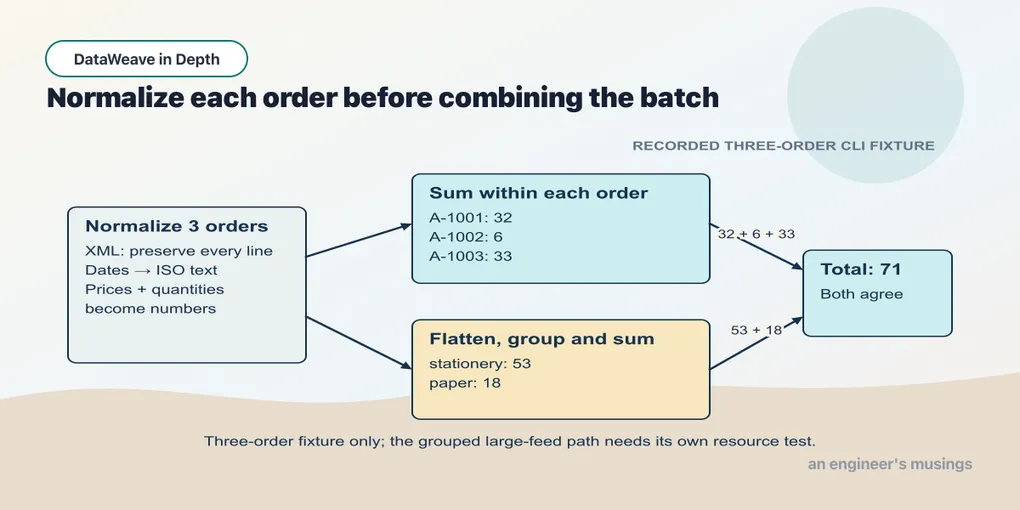
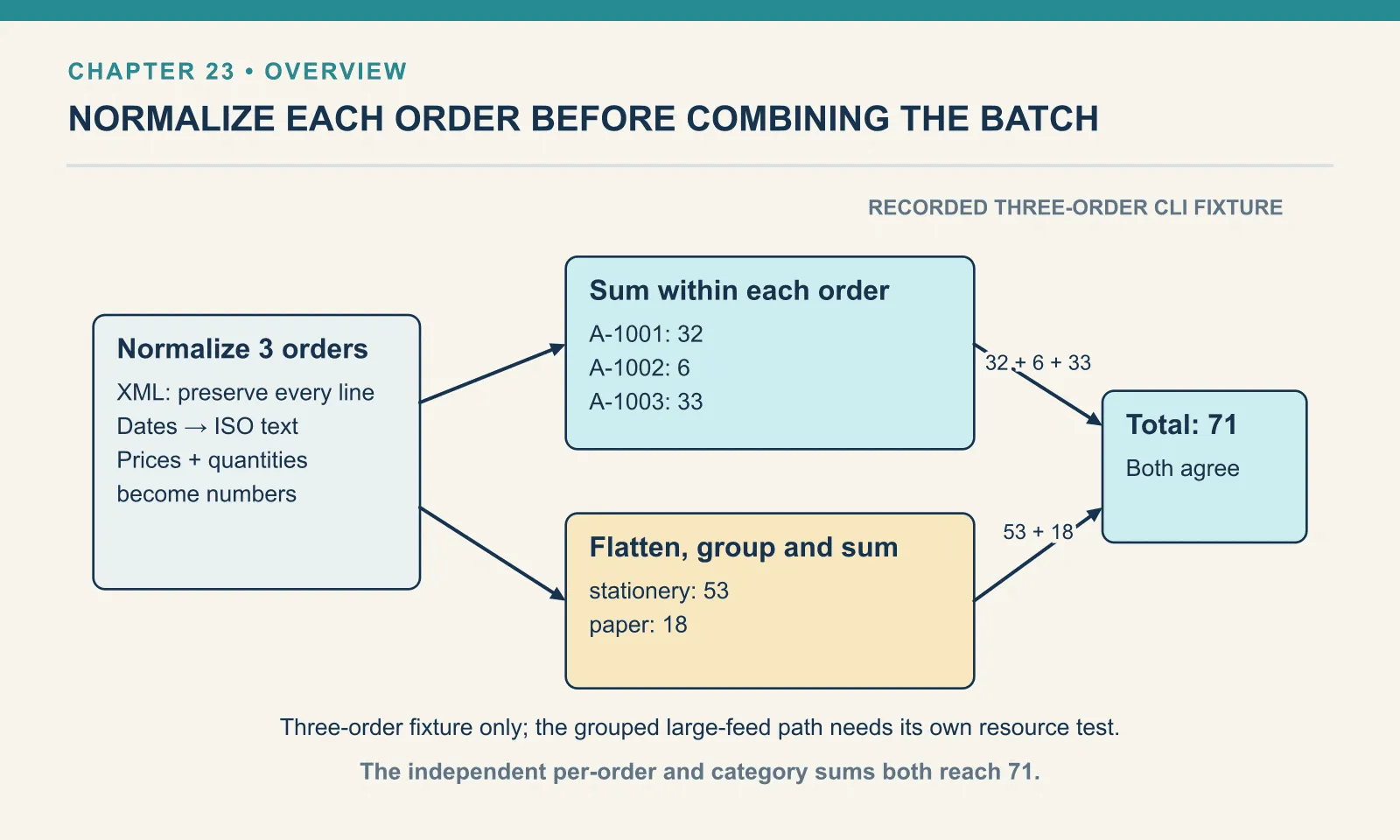
The order totals are 32, 6 and 33. Add those independently and the batch total is 71. Stationery contributes 10 + 10 + 30 + 3 = 53; paper contributes 12 + 6 = 18. The category total, 53 + 18, also gives 71.
Dana and Mei receive the optional vip field because their tiers are gold. Only Dana receives note, because the other normalized notes are null. These are conditional fields, not a global instruction to strip every null.
The output is now a combination of results we have already inspected. The script’s short body is useful because the named module functions carry understandable responsibilities, not because fewer lines are inherently better.
Example 236 — Report an order with no lines.
Input payload — report-an-order-with-no-lines-input.xml:
<ord:orderBatch xmlns:ord="http://shipping.acme.com/orders" batchId="B-EMPTY">
  <ord:order id="A-1004"><ord:placedAt>2026-06-19</ord:placedAt><ord:customer tier="standard">Tomas</ord:customer></ord:order>
</ord:orderBatch>
%dw 2.0
ns ord http://shipping.acme.com/orders
import normalizeBatch, report from orders::Feed
output application/json
---
report(normalizeBatch(payload.ord#orderBatch))Result:
{
  "batchId": "B-EMPTY",
  "orders": [
    {
      "id": "A-1004",
      "placedAt": "2026-06-19",
      "customer": "Tomas",
      "lines": [

      ],
      "orderTotal": 0
    }
  ],
  "revenueByCategory": {

  },
  "batchTotal": 0
}
The cancelled order remains in the report with an empty lines array and an order total of zero. Its batch has no categories and a batch total of zero. This is the same missing-collection policy introduced in Example 42 — Order totals, applied at the XML boundary before any mapping or aggregation.
This case is part of the finished transform. It is not a repair left for the reader after the ordinary report has been presented as complete.
Example 237 — Verify report reconciliation.
Use inspect-the-batch-shape-input.xml as payload, as above.
%dw 2.0
ns ord http://shipping.acme.com/orders
import normalizeBatch, report from orders::Feed
import fail from dw::Runtime
output application/json
var result = report(normalizeBatch(payload.ord#orderBatch))
var orderSum = sum(result.orders map (order) -> order.orderTotal)
var categorySum = sum(result.revenueByCategory pluck (amount) -> amount)
---
if (result.batchTotal == 71 and orderSum == 71 and categorySum == 71 and sizeOf(result.orders) == 3)
  { passed: true, batchTotal: result.batchTotal }
else fail("Report totals or order count changed")
Result:
{
  "passed": true,
  "batchTotal": 71
}
The expected total 71 comes from the fixture calculation above. Merely comparing three computed totals with one another would allow all three to agree on the same wrong answer. This test also checks the order count. Keep the detailed golden report to check the identities, dates, notes and category names that these aggregate assertions cannot establish.
Try it
Add a fourth order with no lines to the ordinary batch. Predict the order count, category totals and batch total. Then change one price currency to EUR and predict whether the report succeeds.
Show answer
The count becomes four while the monetary totals stay 53, 18 and 71. The EUR price fails normalization under the stated USD-only contract. Supporting multiple currencies requires a new output contract, such as totals grouped by currency; silently summing them would not be a valid extension.
Exercises
Revenue by tier. Starting from the normalized orders, group receipts by tier and return the order count and revenue for each tier. Keep grouping separate from mapping the groups.
Show answer
Example 238 — Revenue by customer tier.
Use inspect-the-batch-shape-input.xml as payload, as above.
%dw 2.0
ns ord http://shipping.acme.com/orders
import normalizeBatch, receipt from orders::Feed
output application/json
var orders = normalizeBatch(payload.ord#orderBatch).orders
var tiers = orders groupBy (order) -> order.tier
---
tiers mapObject (orders, tier) -> {
  (tier): { orders: sizeOf(orders), revenue: sum(orders map (order) -> receipt(order).orderTotal) }
}
Result:
{
  "gold": {
    "orders": 2,
    "revenue": 65
  },
  "standard": {
    "orders": 1,
    "revenue": 6
  }
}
Gold contains Dana and Mei: 32 + 33 = 65. Standard contains one order worth 6. Naming tiers also prevents the next operation from becoming part of the grouping callback.
The same report as XML. Return a report root containing one order element for each receipt, with identifier and date attributes and the total as text.
Show answer
Example 239 — Write report totals as XML.
Use inspect-the-batch-shape-input.xml as payload, as above.
%dw 2.0
ns ord http://shipping.acme.com/orders
import normalizeBatch, report from orders::Feed
output application/xml
var result = report(normalizeBatch(payload.ord#orderBatch))
---
report: {
  (result.orders map (order) -> {
    order @(id: order.id, placedAt: order.placedAt): order.orderTotal
  })
}
Result:
<?xml version='1.0' encoding='UTF-8'?>
<report>
  <order id="A-1001" placedAt="2026-06-14">32</order>
  <order id="A-1002" placedAt="2026-06-16">6</order>
  <order id="A-1003" placedAt="2026-06-18">33</order>
</report>
The parentheses splice the array of single-field objects into the root object. The XML writer sees repeated order keys and emits sibling elements, as in chapter 19. Both representations use the same normalized dates and calculated totals.
The report has separate places to investigate source shape, conversion and calculation. Its small fixture establishes correctness for those cases. It does not establish how much memory a large batch requires; that is the next investigation.
Comments