Save It, Then Read It Back
Configure JDBC, bind SQL parameters, inspect insert results and query independently stored state.
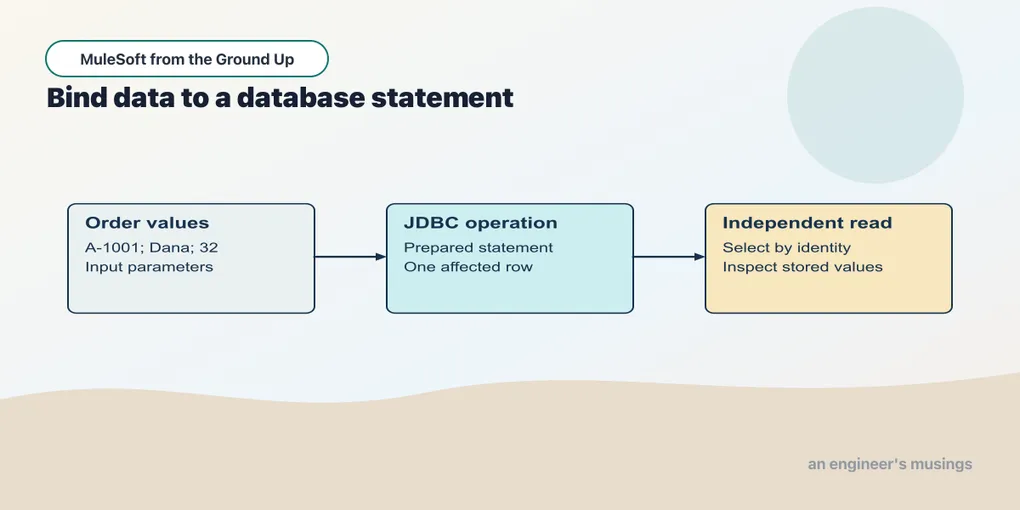
An order has reached the API, passed validation and acquired a total of 32. Returning that total proves the transformation works. It does not prove the order exists anywhere after the process stops — persistence is a different boundary, and a response can say an order was saved without there being a row to retrieve. So this lesson ends with a second request that reads the row independently, which is worth more than a reassuring message from the insert flow.
Checkpoint 11 uses an isolated H2 database. Its purpose is to make JDBC behavior reproducible locally before adding a production database or deployment network.
Open this checkpoint in ACB
Stop the previous local application, then use File → Open Folder to open book/checkpoints/11-database. Open src/main/mule/app.xml and use Flow List to select the named flow for each example. Choose Run and Debug → Run Mule Application and wait for deployment. Save canvas edits and use Save and Hot-deploy to Local Runtime before repeating a request.
Run python3 book/run.py verify 11 from the companion root to exercise this running checkpoint with its synthetic fixtures. The verifier supplies requests and checks results; it does not start the ACB application. Keep the editor on this checkpoint while reading a failure so an old deployment cannot supply a misleading answer.
Supply both connector and driver
The Database connector provides Mule operations such as Insert and Select; the JDBC driver speaks the database’s protocol; the database itself enforces its constraints and commits the change. A useful integration keeps those three responsibilities visible — otherwise a retry policy can turn a missing response into a duplicate order. This checkpoint pins Database Connector 1.15.1 and H2 2.3.232. The POM exposes H2 as a shared library to the connector; choosing a connection type alone would not install the driver, and a class-not-found error at deployment is a question about dependency resolution and visibility rather than about the SQL.
Example 027 — Configure the local database
The complete source is in checkpoints/11-database/src/main/mule/app.xml.
Select a Database component on the canvas and open Edit Connection for Orders_DB. The connection type is Generic Connection. Inspect these values:
| Setting | Value |
|---|---|
| URL | jdbc:h2:mem:orders_learning;DB_CLOSE_DELAY=-1 |
| Driver class name | org.h2.Driver |
| User | sa |
| Password, expression mode | '' |
Use the project’s supplied H2 dependency. ACB’s external-library configuration is where a connector’s driver is made available; selecting a database operation alone is not a driver installation. Apply connection changes before running the flow.
The URL names an in-memory database in this JVM. DB_CLOSE_DELAY=-1 keeps that named database alive when its last connection closes; it does not retain data after the runtime terminates. The empty password expression is a local fixture setting. The earlier runtime rejected a literal empty password attribute, which is why the working configuration uses an empty-string expression.
The main project POM contains the connector, ordinary H2 dependency and Mule plugin shared-library declaration together. Appendix A explains the version inventory and build workaround. Keep those pieces aligned when reproducing the example with a different driver.
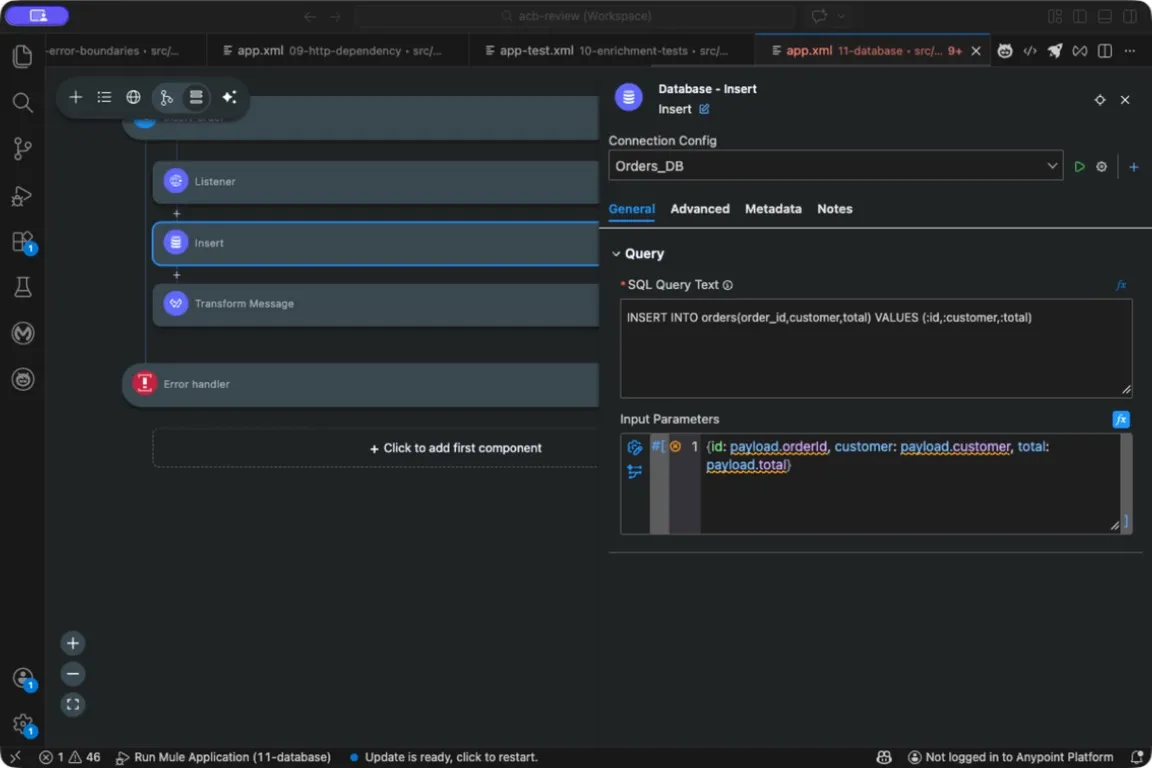
The SQL names its parameters with colons; the Input Parameters expression supplies their values. The red marker on the parameters line is a design-time metadata diagnostic, not a runtime error; Appendix A explains why these schema-free projects show them.
Prepare a table you can reset
Example 028 — Prepare the isolated orders table
The complete source is in checkpoints/11-database/src/main/mule/app.xml.
Choose Flow List → prepare-orders. The Listener’s POST path is /lab/setup. Select Execute DDL, confirm Connection Config Orders_DB, and inspect its SQL:
CREATE TABLE IF NOT EXISTS orders (
  order_id VARCHAR(40) PRIMARY KEY,
  customer VARCHAR(80),
  total DECIMAL(12,2)
)
The next Delete component uses the same connection and SQL DELETE FROM orders. The final Set Payload has text Value ready. Run this setup only against the isolated teaching database:
curl --include -X POST http://127.0.0.1:18881/lab/setupThe table has an order identity, a customer label and a decimal total. Making the order identifier the primary key is a business decision as much as a schema one: one row per order identity, so when the same order arrives a second time it has to be recognized or rejected — the delivery cannot silently create a second independent row under the same key. The setup flow creates the table if necessary and then deletes its rows so the exercise starts from a known state.
POST /lab/setup is a teaching control, not an order API operation. Use it only with this isolated database. The reset explains why the verification command is repeatable; it should never be pointed at a database containing real orders. An application that alters its tables on every incoming request also makes schema change inseparable from ordinary traffic, and production schema evolution deserves a migration process with an owner and a rollback plan.
DDL creates the schema. The later transaction experiment keeps this setup outside the transaction being tested so schema-change behavior cannot obscure the row-write result.
Bind data as values
Example 029 — Insert a calculated order
The complete source is in checkpoints/11-database/src/main/mule/app.xml.
Choose Flow List → insert-order. Select Insert, use Connection Config Orders_DB, and put this statement in SQL:
INSERT INTO orders(order_id,customer,total)
VALUES (:id,:customer,:total)
In Input Parameters, use the expression {id: payload.orderId, customer: payload.customer, total: payload.total}. Open Advanced → Output, set Target Variable to insertResult, and keep Target Value payload.
Select the following Transform Message. Its JSON payload script returns {orderId: payload.orderId, affectedRows: vars.insertResult.affectedRows}. The target is what keeps the input order available to that script.
Send this deliberately flattened database fixture to /lab/orders after setup:
{"orderId":"A-1001","customer":"Dana","total":32}The SQL names parameters with colons. The input-parameters object supplies their values. A parameter is a value, not a fragment of SQL syntax, so the customer’s name stays a value even when it contains an apostrophe and the transform never has to manufacture escaped SQL. Binding covers values only — table names, column names and sort directions are structural choices, and accepting arbitrary client text for those still needs a constrained design of its own.
The Insert operation uses Target Variable insertResult. Its statement result therefore goes into that variable while the input order remains the payload. The response can name the order and report affectedRows: 1 without accidentally treating the statement result as the original order.
This endpoint receives a calculated total to isolate the storage mechanism. It is not the final public intake contract. Chapter 14 will connect validated input and server-side pricing directly to persistence.
Read the row independently
Example 030 — Read a stored order
The complete source is in checkpoints/11-database/src/main/mule/app.xml.
Choose Flow List → read-order. Its Listener path is /lab/orders/{id}. Select Select, confirm Orders_DB, and inspect SQL:
SELECT order_id AS "orderId", customer AS "customer", total AS "total"
FROM orders WHERE order_id = :id
Set Input Parameters to {id: attributes.uriParams.id} in expression mode. Leave the operation’s target empty. The following Transform Message uses JSON output with payload below ---, serializing the selected rows.
Request /lab/orders/A-1001. The parameter comes from the path, and Select returns an array of matching rows:
[{"orderId":"A-1001","customer":"Dana","total":32}]The quoted SQL aliases choose the JSON-facing field names. A driver can expose column labels differently from what a transform expects — a query that succeeds and yields ORDER_ID where the transform selects orderId is a data-contract failure, not a connectivity failure, so the explicit aliases make the intended shape inspectable in both the SQL and the JSON. Select returns an array even though this primary-key query can match at most one row. Requesting an unknown identity returns an empty array. The later public API will deliberately map that absence to its not-found response.
The second HTTP request matters. It reads database state after the first operation finished, rather than inspecting the same in-memory variable that supplied the insert.
Keep queries bounded
A query by primary key has a natural result bound. A search endpoint does not. Parameterize search values, define a page size and choose a stable ordering before returning a large result set — a page ordered only by a non-unique timestamp can skip or repeat orders when several share that timestamp, so a tie-breaker such as the order identity belongs in the design. Fetch size controls how a driver obtains rows; it is not a substitute for limiting the query’s result contract.
Likewise, one connector invocation containing several writes does not by itself establish all-or-nothing behavior. Bulk operations can have partial outcomes. Before increasing the amount of work, we need to inspect a transaction’s resource and owner.
Try it
1. Query an absent identity. Why is the result [] rather than an object with empty fields?
Show answer
Select returns the rows that matched the query. No matching row means an empty result array. An application can then map that absence to its public contract; the connector does not invent a row.
2. Insert the same identity twice. Does the primary key already implement friendly request replay?
Show answer
No. It prevents duplicate rows with that key, but a repeated insert fails rather than returning a recorded successful response. Business idempotency will add an explicit interpretation of repeats and conflicts.
3. Stop the runtime. Should this table retain its rows after a fresh runtime start?
Show answer
No. It is an in-memory H2 database. DB_CLOSE_DELAY=-1 changes connection-lifetime behavior within the process, not restart durability. A later persistent profile is introduced before recovery tests.
The insert and read-back establish one stored row. Next we will make failure happen between writes and inspect which changes remain.
Comments